
It’s been a while since we had an SSD in our labs. It’s now done since we are back with the first “gamer SSD” from the American giant Kingston: the Kingston FURY Renegade.
Yes, as a reminder, last March, HP bought the peripherals division of HyperX, then owned by Kingston and which represented the range of gamer products of the brand. However, Kingston has kept its DRAM, flash memory and SSD division, and the American manufacturer has found a new name for its gaming range: Kingston FURY.
 It is precisely one of the products of this new range that we find on the test bench today.
The Kingston Fury Renegade is an M.2 2280 PCIe 4.0 SSD that uses the latest NVMe 1.4 protocol and is available in 512GB, 1TB, 2TB and 4TB capacities .Its specifications indicate read and write performance of up to 7.3 GB/s with up to 1 million read and write IOPS. We note that at the end of October 2021, Kingston launched the Kingston KC3000, with specifications close to the Fury Renegade on paper.
But while on the market, brands like Samsung, Seagate, Western Digital or Sabrant have been offering us NVMe PCIe 4.0 SSDs for a year now, what makes the Fury Renegade different from them? We will try to answer this question after the presentation and the test of the product
[nextpage title=”Kingston FURY Renegade Overview”]
Can we do an unboxing without a real box?
Let’s start with the packaging, which has been reduced to the bare minimum. It must be said that it is a bit light for a product costing several hundred euros. But the disk is still well protected, since it is under a particularly rigid plastic protection. Certainly it is a good point for the environment, but some will regret the absence of a real box.


As the photo above illustrates, the plastic protection is inseparable from the packaging. At least not without having to rip out the entire box. Inside, in other words, between the two layers of cardboard, we find an OEM license for Acronis True image HD. This allows you to clone your previous disk or make backups of your data before reinstalling your operating system.
Quick overview of the disc itself

 On the front panel, a very thin aluminum heat sink, covered with a layer of graphene allows to dissipate heat. In the center, we find the brand and its logo, on the right the range and on the left the information on the format and the interface. At the back, no graphene. We find once again the brand, the storage capacity, the product reference, the serial number, the version of the ” firmware “. We also note that the label also serves as a warranty seal, as evidenced by the message ” Warranty void if removed “.

We can also check the presence of firmware update with the Kingston SSD Manager software. The update should be able to be done directly from the software (we did not have the opportunity to test it), and it gives us different information like the S.M.A.R.T report, the temperature or the events related to the disk.
What’s under the hood?
As a main component, the new Kingston FURY Renegade relies on the Phison PS5018-E18 controller (Datasheet), which is also found on other high-end SSDs, such as the Seagate FireCuda 530.
The choice of this controller is interesting since the Phison E18, engraved in 12 nm by TSMC and operating at 1 Ghz, is known not to heat up too much. It is based on a triple-core Arm Cortex R5 CPU architecture. In order to offload the routine and repetitive code operations of the firmware, there is a dual-core coprocessor. All of this is intended to speed up write operations thanks to larger operation queues. As a result, we can expect to get record performance from this controller, which can fully exploit the PCIe 4.0 x4 interface.
The controller connects eight 256GB 3D TLC flash memory modules. The chips are the latest Micron 176-layer 3D TLC NAND B47R (renamed Kingston FB25608UCM1-9E) . They are located on both sides of the PCB. These are configurations that can be found on other SSDs of other brands. However, each manufacturer adapts its own firmware version.
Although the speed of an SSD depends mainly on the speed of the controller and the memory chips, the distribution of the eight chips in parallel makes it possible to increase the writing speed. This is probably one of the reasons why the 512gb and 1TB versions have advertised sequential write speeds of 3,900MB/s and 6000MB/s.
Finally, the controller is backed up by 2GB of Kingston DRAM for the SSD’s mapping tables. However, the size of the SLC cache remains unknown.
Kingston FURY Renegade technical sheet
- Brand: Kingston
- Series: FURY Renegade
- Reference product: SFYRD/2000G
- Storage capacity: 2Tb
- Format: M.2 2280
- Interface: PCIe 4.0 NVMe 1.4
- Controller: Phison E18 (PS5018-E18)
- NAND: 3D TLC Micron B47R 176-layer
- Dimensions: 80 mm x 22 mm x 3.5 mm
- Weight: 9.7 grams
- Max sequential speed: 7300 MB/s read and 7000 MB/s write
- 4K random read/write: up to 1,000,000 / 1,000,000 IOPS
- Total number of written bytes (TOE ) : 2 POE (Peta Bytes)
- Mean time to failure: 1,800,000 hours
- Warranty: 5 years
A “gamer” SSD?
To say the least, these features are impressive on paper.
Let’s stop on an interesting figure which is the TOE, for Tera bytes written (TWB in English), of 2 POE (that is to say 2000 To). More concretely, it is a value used to give an estimation of the life of the SSD.
For our FURY Renegade, a quick calculation of the TWB based on the five-year warranty means that it will be possible to fill and empty a little more than half of the total capacity of the SSD every day. That’s still about 1.1 TB written and deleted daily for five years (2000 TB written / 1825 days = 1.09 TB / day).
This figure is important and helps justify the name “Gamer SSD”, in addition to the overall speed of the SSD. The Kingston FURY Renegade is also compatible with the PS5. The official product page promotes this compatibility through visuals and a video of the installation of the SSD in the latest console from Sony.
Let’s remember that nowadays, it is not uncommon to have games that are well over 100GB. On the 1TB version, this means not being able to install more than 10 games at the same time. This is an important detail for players who are forced to delete and re-download their games regularly (provided they have a good internet connection of course)
[nextpage title=”Test protocol:”]
For this test we will use a part of the 2020 SSD protocol and we’ll add some recently released benchmarks to compare the data. To make sure we get the maximum bandwidth, we will use the latest Alder Lake platform from Intel. The SSD is inserted into the M.2 PCIe Gen 4 x4 slot closest to the CPU. We also added the heatsink on the motherboard, which must first be unscrewed before accessing the M.2 slot.

Why do we use an extra heatsink?
In our configuration, the slot used is the one closest to the CPU. The main reason is that it is the only PCIe 4.0 line directly connected to the CPU. The other two are connected through the Z690 chipset, which would mean sharing the chipset bandwidth with other components.
Thus, if the SSD is able to use all the bandwidth it is allowed, it may heat up a lot. Add to this the presence of the GPU which blows hot air right underneath. These heat sinks are therefore necessary in such configurations. In addition, too high temperatures can even damage the SSD in the long run.

Benchmarks used :
- Final Fantasy XIV Benchmark
- PCMark8 Storage (Battlefield 3 v2 and Adobe Photoshop Heavy v2)
- 3DMark Storage Benchmark
- Crystal Disk Mark
- ATTO Disk Benchmark
- HD Tune Pro
- AS SSD Benchmark (bonus)
- Anvil’s storage utilities (bonus )
Test configuration
- Motherboard: MSI PRO Z690-A DDR4
- Processor: Intel i5-12600KF
- Memory: 2×16 GB G.SKILL TRIDENT Z (4100 MT/s CL 16-16-16-32 2T)
- Graphics Card: NVIDIA RTX 3080 FE
- Cooling system: EK AIO 360 d-RGB
- SSD: KINGSTON FURY RENEGADE 2 TO (with additional heatsink)
- Power supply: MSI MPG A850GF 850W
- Operating system : Windows 11 (installed on the SSD)
[nextpage title=”Video games:”]
Final Fantasy XIV:
As per usual, we start with the FFXIV benchmark , and its scene loading. The benchmark is quite complete on the whole. It gives of course a score related to the loading times. Five scenes are used for the benchmark. So we will have a result of loading time in seconds composed by the sum of the five readings. The FFXIV benchmark always gives very accurate readings with low variations.


As expected, the FURY Renegade crushes the previous SSDs tested. It cuts load times in half on FFXIV however, the test configuration is different and much more modern.
Final Fantasy players will in any case be able to rejoice at the loading times per scene: 0.9 sec, 1.63 sec, 2.55 sec, 1.2 sec and 0.5 sec.
Battlefield 3:

We continue the series of game load times with Battlefield 3. We use PCMark 8 which offers an integrated benchmark based on this game. To make PCmark 8 work, we had to reinstall Windows 10 because the benchmark did not work under Windows 11. The test configuration remains exactly the same.
We notice that the FURY Renegade is still the fastest, but the difference between the different SSDs is only a few seconds or milliseconds. We can perhaps put this result down to the age of the benchmark. Or simply, the difference between a PCIe Gen 4 SSD and a previous generation SSD has only a marginal influence on the load times of older games. Nevertheless, the FURY Renegade maintains its leading position in all tests so far
3DMark Storage Benchmark:
 New to the list is 3DMark’s Storage benchmark which tests access, read, write and game launch speeds. The Kingston FURY Renegade gets a score of 4402 points. Since we don’t have any points of comparison, we’ll take the median score from a list of SSDs that 3DMark provides in its documentation.
 On this test, which is much more recent and more adapted to the latest SSDs, our Kingston crushes its competitors
Be careful, however, to keep in mind two important details
First of all, the results of the other SSDs are median scores given by 3DMark as a reference point. We have no knowledge of the number of samples used to calculate this median score, nor do we know what configurations were used.
Secondly, I would like to remind you that we have a 2TB model, while all the SSDs on the chart are 1TB SSDs. As we could see during the product presentation, the 1TB versions are slower, especially during write operations. Nevertheless, in absolute terms this is an excellent score.
Indeed, we can consult the database of scores and situate ourselves in relation to the others. At the time of writing, we are in the top 100, with our Kingston being outranked mostly by professional SSDs, especially the Intel Optane SSDs.
To go further
Feel free to check out our full score on 3DMark Storage Benchmark if you like. On the one hand you will have access to all the results, on the other hand you will be able to see how the FURY Renegade compares to its direct competitors.
To take another example, or to compare our results with an SSD of your choice, nothing could be easier. First, follow this link, which is one of our 3DMark Storage benchmark results. Then click on ” Add to compare ” below the results. And finally, at the bottom of the page, click on ” Add results “. From there, you can add other scores and compare side by side our results and those you have chosen.
[nextpage title=”Application:”]
The tests we did around video games are starting to show the contours of an SSD that seems to deliver on its promise. If the Kingston FURY Renegade is as comfortable in application testing as it is in gaming, then Kingston will have pulled out all the stops for its comeback.
The main selling point is certainly very gaming oriented. But in reality, a PC user, like a PS5 gamer, is not limited to video games. It would be presumptuous of me to conclude here by giving the argument that I can guess in advance what the results will be if I continue the tests.
But since we at overclocking.com prefer to indulge in rigor rather than speculation, we won’t stop without the usual application tests. Whether it’s a gamer SSD or not, protocol is protocol. No different treatment, so we continue with the Kingston FURY Renegade application tests!
PCMark 8 Photoshop
PCMark 8 offers an integrated benchmark in which there is a test called ” Photoshop Heavy V2 “. This one is much longer than the one for ” Battlefield 3″. Indeed, it follows a whole workflow composed of 18 steps. The load is based on editing a very high resolution photo to create a poster. The source file is a 113 MB image with a resolution of 5184 x 7744, while the final file is a 1320 MB poster with a resolution of 7000 x 10457. We use it to subject the SSD to heavy application tasks.  No big surprise, once again the PCMark 8 benchmark seems to level the performance towards a minimum time of 348 to 350 sec. It’s as if we’ve reached the minimum time it’s possible to achieve on this version of the test.
Note that PCMark 10, the new version of PCMark, also includes an entire test dedicated to storage In the future we will use this version which will be better suited
PCMark Express 10 :
Speaking of PCMark 10, we can already start to see what the Apps score test gives us. Indeed, the latter gives a representative score of storage performance by calculating the launch times of four applications.
 We get a score of 18,400 to 18,500 points on three series in a row. This is an excellent figure and puts me in 57th place in the ranking at the time of writing. For comparison, I’m ahead of one person with a Samsung 980 PRO 1TB and just ahead, an Intel Optane 905P.
I performed the same test from a 512GB Crucial MX500, and I get 8200 points. You can find the detailed score at the following address.
[nextpage title=”Sequential and random speeds:”]
Crystal Disk Mark:
Next we move on to the synthetic tests, performed via various benchmarks. The first one will be Crystal Disk Mark in its version 6.0.2 x64. We will get the read and write values in sequential and random mode.
The interest of Crystal Disk Mark is that it shows the results in sequential, random and random read/write with multiple queues.


Although there is a more recent version of Crystal Disk Mark, the sequential read and write speeds are not really impacted. They are even higher on version 6.0.2 as shown in the picture above. This also allows us to better compare our Kingston to previous SSDs tested, thanks to the homogeneous data allowed by the use of the same version.
Sequential Read:
 Here, the least we can say is that the Kingston is at full speed since it almost reaches the maximum theoretical speed announced by the manufacturer. The comparison with the other SSDs that we tested becomes almost decorative as the difference is enormous. But let’s not forget that the sequential test is above all the one that manufacturers use to promote their performance. It is therefore a good way to check whether a manufacturer has tried to inflate its figures or not.
We repeated the test dozens of times and with different file sizes, the Kingston FURY Renegade consistently maintains these speeds.
Sequential Write:
 In writing, this is often where we see the speeds drop. Here nothing of the sort as we are only slightly below the reading speeds. The Phison E-18 controller did not lie about its capabilities.
Random Play:
 The QD1 and QD32 4k random read test gives a closer representation of reality. In QD1 random playback, we reach 95 MB/s, and in QD32, 1297 MB/s. These are still excellent figures. The QD32 is of course significantly higher than the QD1 since it means that we put 32 requests in parallel.
Random Write:
 In random writing, the figures are excellent, with 436 MB/s in QD1 and 1 GB/s in QD32. [nextpage title=”Speeds by file size:”] We will take advantage of the ATTO Disk Benchmark measurements to perform read and write speed tests on files ranging from 512 bytes to 64 MB. We will present you a curve proposing to visualize directly the speeds in each mode (read / write). This will allow you to visualize the behavior of the storage unit according to the size of the files handled.


Read rate as a function of file size
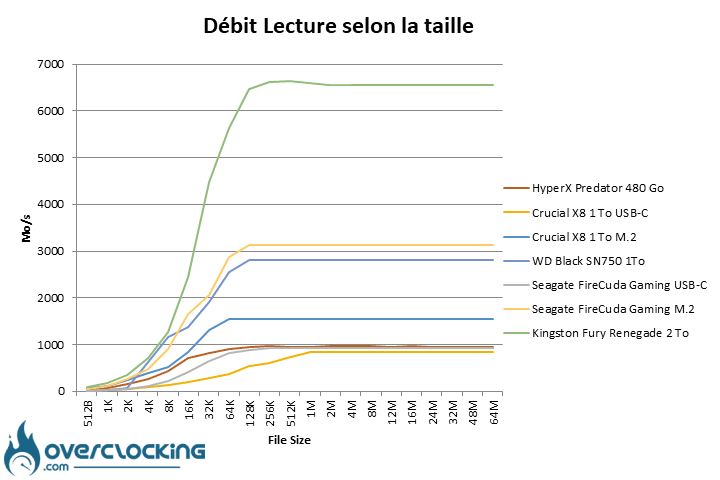 On this flow test carried out with ATTO DISK Benchmark, we have taken the data and made a curve which allows to appreciate the speed and the constancy of Kingston in the reading operations.
We can clearly see that it remains the fastest regardless of the file size. The curve then makes an almost straight line that reaches a maximum of 6560 Mb/s.
Write throughput vs. file size:
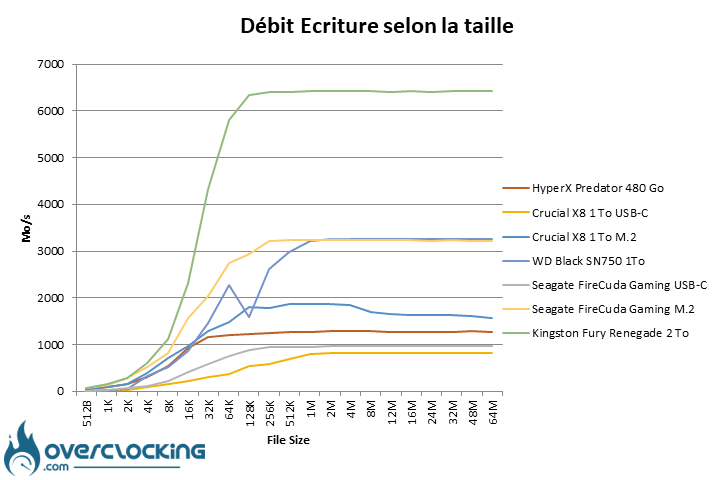

On the write throughput test, we have the impression to visualize the same curve as the read throughput. The only difference is the 6400 MB/s speeds.
Kingston FURY Renegade temperature readings
Concerning the temperatures recorded via HWINFO, the disk remains under 40°c on the operations of read, and reaches but without never exceeding them, the 55°c at the time of the sustained operations of writes.
As a reminder, these temperatures are with the SSD under the heatsink of the motherboard. The Phison E18 controller remains stable at 69°c and sometimes reaches 71°C, which is within the manufacturer’s specifications.
[nextpage title=”Access time:”]
Finally, we will finish this series of tests with an access time survey. We will use the HDTune Pro software. We will present you the graph of these readings, which give a good visual representation of the access times of the disk.
 The access time readings give a good idea of the performance of small file read rates. We saw earlier that the Kingston FURY Renegade was at home on both small and large files.
The measurement shows us once again the ease of the controller since the maximum access time measured is only 34 µs.  In writing, we obtain even better times with only 10 µs. It is a faultless performance.
Some additional data about the FURY Renegade
In order to double check the data obtained through the different tests and to verify that no software had become too old to effectively measure the performance of the SSD, I used other software whose results I share with you “raw”.
This allows us to validate the consistency of the results obtained across all benchmarks.
AS SSD:
AS SSD Benchmark is a program that we will use in our future tests. Not only does it run various performance tests like Crystal Disk Mark, but it does much more. With this test, we will be able to obtain three scores that will be useful for future comparisons. The first one is a read performance score, the second one is a write performance score, while the last one is the sum of the two and thus gives an overall score. We can also notice that in addition to the throughput, we obtain at the same time the access times, but also the number of input/output operations per second (IOPS), which are data that can be found on the manufacturers’ specifications.


AS SSD Benchmark is available for free on Softonic.com or on the official developer’s website.
Anvil’s Storage Utilities:
Anvil’s Storage is another very useful software for testing and comparing different drives. It offers us a variety of data that allows us to cross-reference the results achieved in other tests. Also, as with AS SSD, we get three different scores: a read, a write and a sum of the two.  Anvil’s Storage Utilities is available for download on Guru3D.com or on Softpedia.com [nextpage title=”The last word:”]
I have been using and testing the Kingston FURY Renegade daily for two weeks now. The least I can say is that I’m bluffed by the performance of this device.
We chose to continue to use it regularly during the writing of this test. We wanted to see if it was possible to perceive slowdowns as it fills up. Well, we did not notice anything until 80% filled with all kinds of files. On the other hand, from 90% onwards, the benchmark results started to decrease slightly. Nevertheless, when it comes to the feeling of use, no difference.

What about the price?
Finally, a word about the price that we have not really discussed. At the moment we can find the Kingston FURY Renegade in its 2Tb version, between $200 € and $250 depending on the online seller. Amazon offers it at $214.99 currently at the time of writing.
This is a price that I currently find attractive. The 1TB model is around $115, and the 4TB is over $550 at Amazon (down from $1000 previously).
Considering these prices, the 2Tb model seems to be the best compromise. Why is that? Because let’s remember that it is from this size that we can benefit from the parallelization of memory chips. The gain in terms of access speed and write rates is consequent, so it would be a shame to go without.
Of course, on a PC, it makes more sense to use twice 2TB if you want 4TB. But PS5 players only have one M.2 slot and the 4TB version makes more sense for them.
A final word on the test itself
This is the first PCIe Gen 4.0 SSD we’ve tested and comparisons to PCIe Gen 3.0 SSDs may appear. But we have several tests of other new PCIe Gen 4.0 SSDs coming up. This will also provide a solid basis for comparison for the next ones to come.
Kingston FURY Renegade PCIe 4.0 NVMe SSD 2TB
We liked:
- Its excellent performance in reading and writing
- Its 2000TB TOE and its 5-year warranty
- The use of the Phison E18 controller
- Memory on both sides of the PCB
- Its minimalist design
- Its very thin aluminum and graphene heatsink on the front panel
We liked it less:
- The lack of clear information about its components
- Its still high price
- The absence of a heatsink on the back
 After the acquisition of HyperX by HP, Kingston is back on the scene with its new line of gamer products called FURY. While the name FURY Beast is probably more known with the launch of the DDR5, the FURY Renegade range seems promising but still needs to be known. In conclusion, the Kingston FURY Renegade 2TB is simply excellent, and represents the best of what is currently available in terms of consumer SSDs.