
Let’s take a quick look back at Cooler Master, where we have the opportunity to test a new CPU cooler model: the V4 Alpha 3DHP Black. With this model, Cooler Master offers a heatsink equipped with so-called “3DHP” heat pipes, but there aren’t very many of them—and for good reason: we only found two. So we’re curious to see how this model performs in our tests. That’s exactly what we’re going to find out right now!
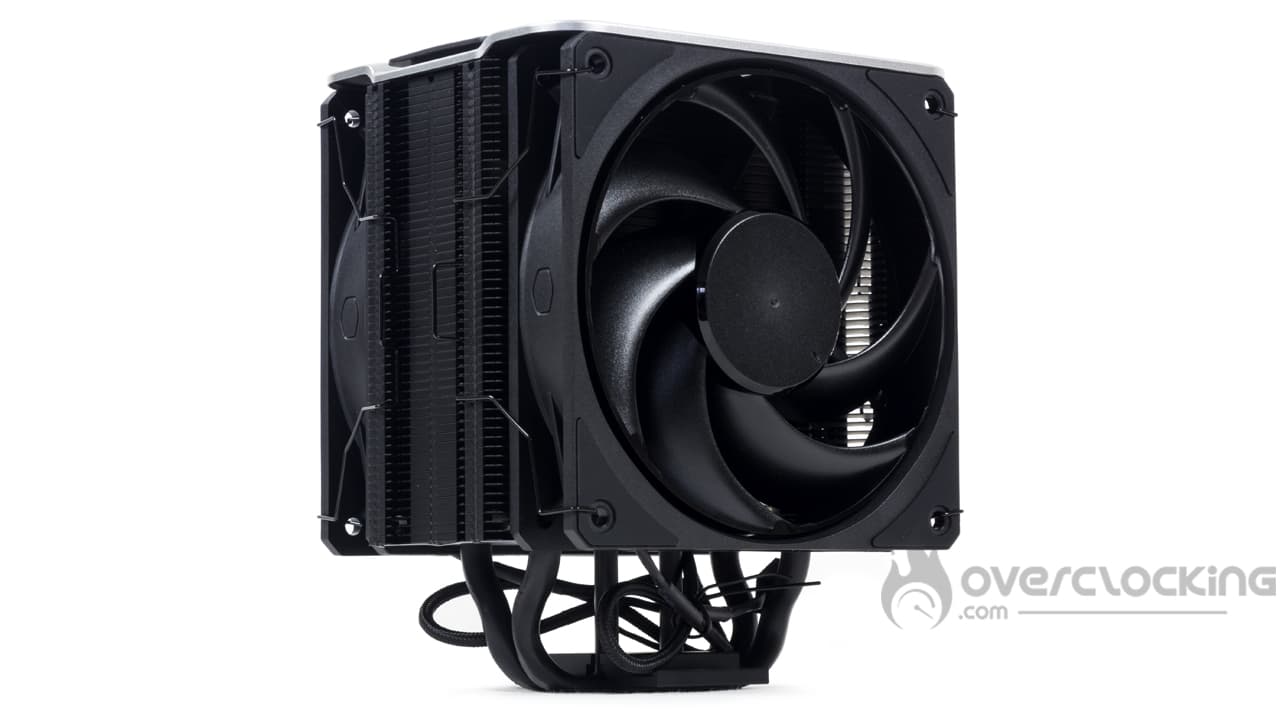
Cooler Master V4 Alpha 3DHP Black, Overview:
With this CPU cooler, the brand offers a model from the 3DHP family—a product line featuring3D heat pipes. Simply put, rather than having a copper tube bent into a “U” shape, the brand adds a piece that’s soldered onto the original tube. This additional piece runs through the cooler’s base and the aluminum fins. The goal is to provide better heat distribution across the network of aluminum fins and expand the heat dissipation area to improve the cooler’s efficiency.
Cooler Master has therefore improved the heat pipes in its cooler by incorporating an advanced internal coating that utilizes different surface textures. There is a grooved section and a second, more granular section. According to the manufacturer, each type of internal coating plays a specific role during the condensation and evaporation of the liquid contained within each heat pipe. Of course, the goal is to maximize cooling performance.
Additionally, the cooler comes standard with two 120 mm Mobius fans mounted in apush-pull configuration. These fans feature blades connected to one another by an internal ring. This helps reduce high-frequency noise while ensuring a certain degree of rigidity for the entire fan assembly.
As for the base, it is made of copper and offers a large contact surface with the processor’s IHS. Additionally, note that the heat pipes are not mounted in direct contact with the CPU, which maximizes contact with the CPU and minimizes gaps where the heat pipes pass through.
Finally, a quick note on the design, which aims for minimalism, while the brand claims it’s inspired by the shape of a V-engine. But between us, this design isn’t as polished as that of the V8 Ace 3DHP Black. Nevertheless, the finish is well done, so let’s not let that take away from our enjoyment.
 Clearly, this isn’t a brand-new cooler. In fact, it was launched in October 2025, so it’s about a year old. During that time, it’s been distributed to many stores, and prices vary widely—with some retailers offering it at its original price of €40 and others taking a more aggressive approach. As a result, you can find it for around 30 € or even less, depending on current promotions.
Unboxing:
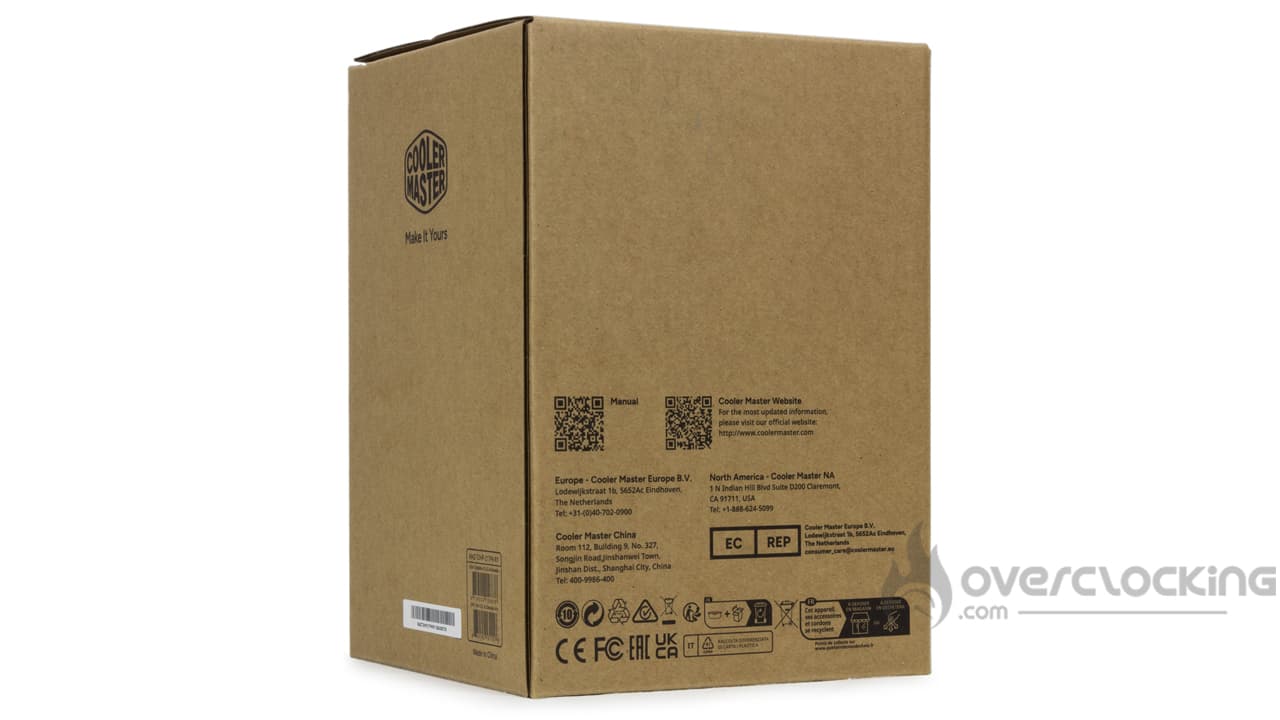
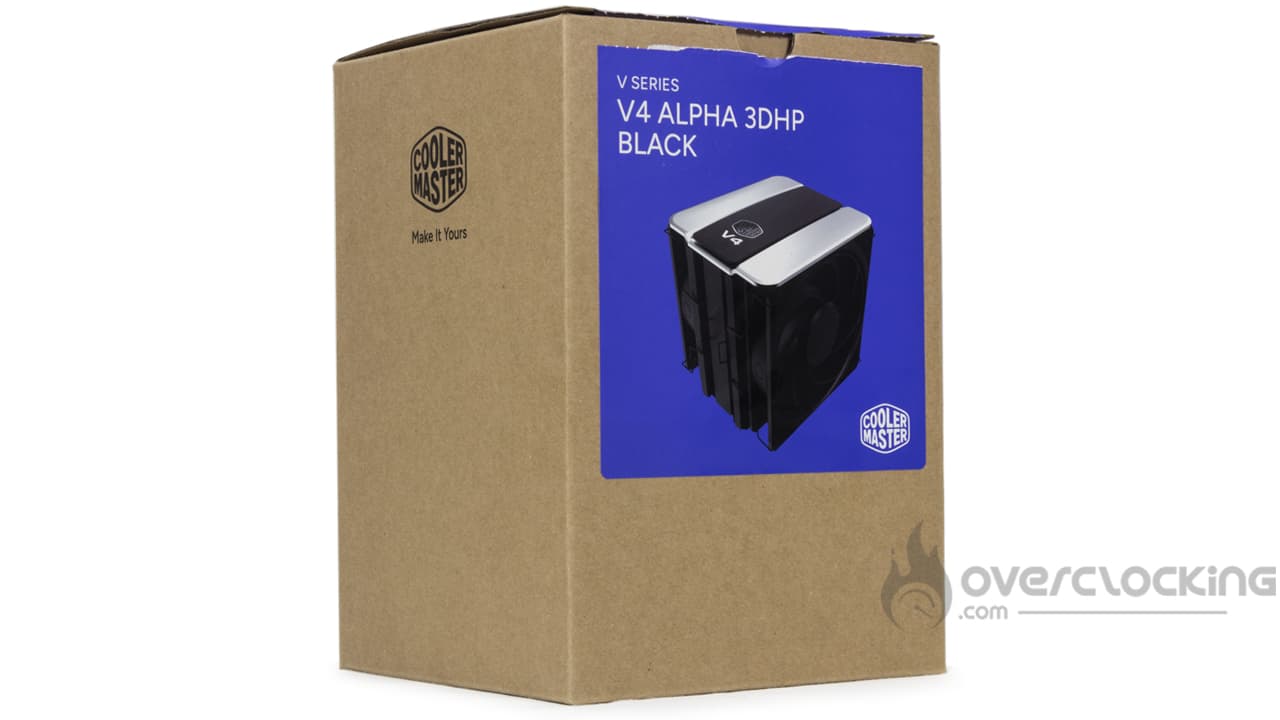
Clearly, the brand has opted for packaging that couldn’t be more minimalist here, as the CPU cooler arrives in a brown cardboard box featuring an illustration of the heatsink on a purple insert, which also lists the cooler’s detailed specifications.
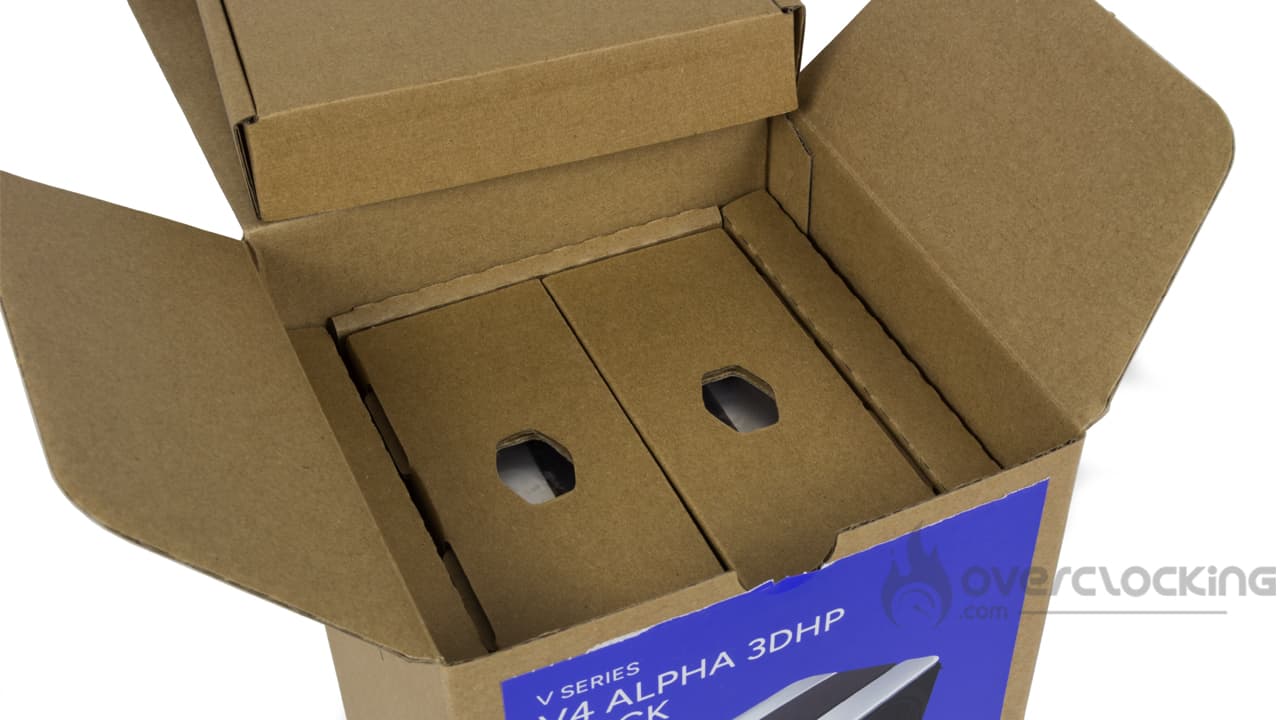
Inside, the product is well protected by several layers of cardboard, with the V4 Alpha 3DHP Black packed in a plastic bag. The accessories are housed in a box positioned on top of the assembly. In short, the packaging is unassuming and the protection is effective: no damage was found upon receipt.
The heatsink:
Weight and Dimensions:
With this model, be sure to check compatibility with your PC case. It stands 161 mm tall—a mere millimeter that could prevent your side panel from closing, especially with the most compact or entry-level models. Otherwise, the product measures 133 mm wide and 114 mm deep, including its two fans.
As for the weight, it isn’t officially listed, but we weighed it at XXX g on our kitchen scale.
The Base:
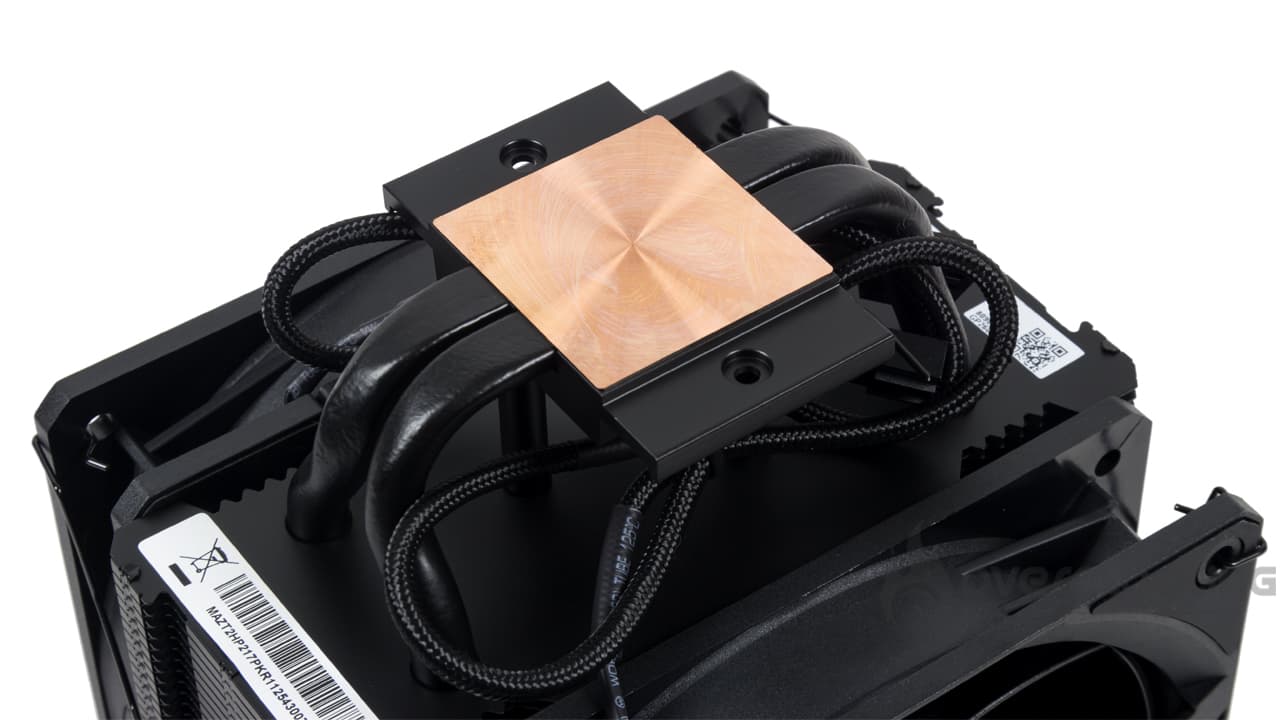 Beneath the heatsink, we find the copper base—and here’s a little surprise: it’s not nickel-plated. In fact, we’re used to seeing either a nickel-plated base or heat pipes mounted indirect contact, but this type of finish is actually quite rare. In any case, we can clearly see the two 3DHP-type heat pipes. In the photo above, we can see the arm passing through the aluminum fin stack. Finally, in terms of dimensions, the base measures 35 x 38 mm—a surface area large enough to cover the entire IHS of Ryzen and Intel processors with LGA-1700/1851 sockets.
The heatsink/finish:
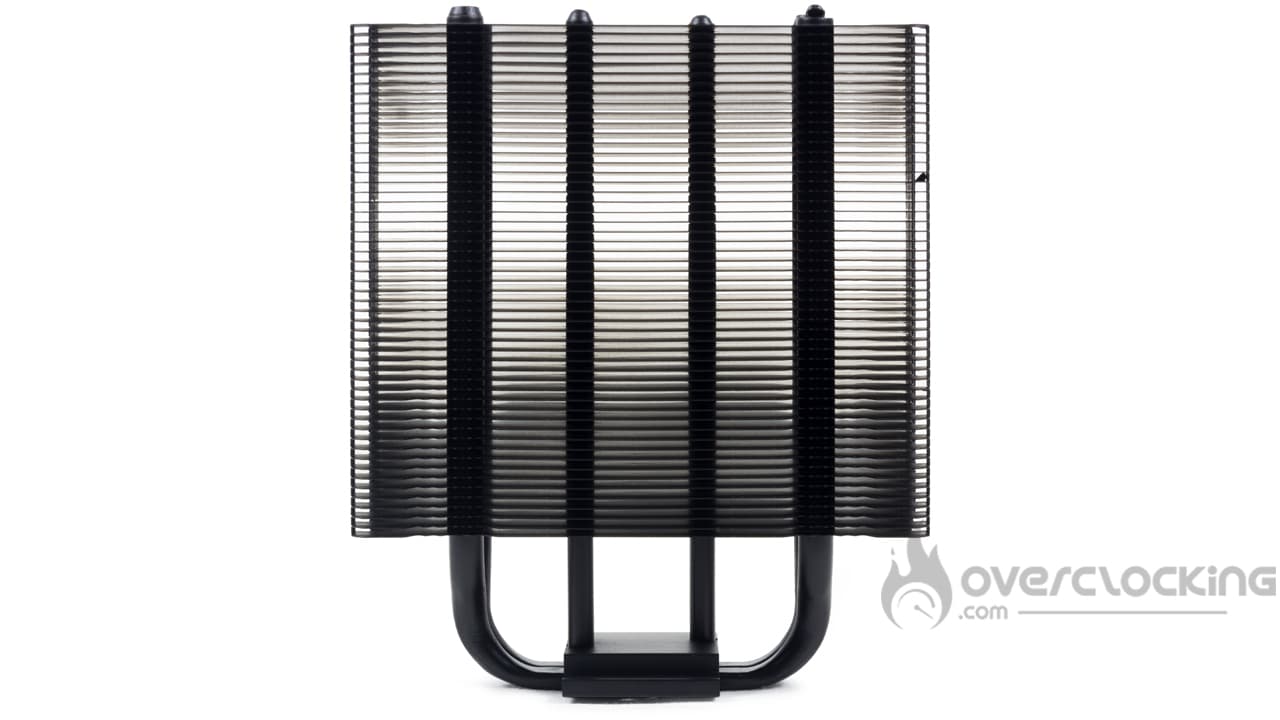
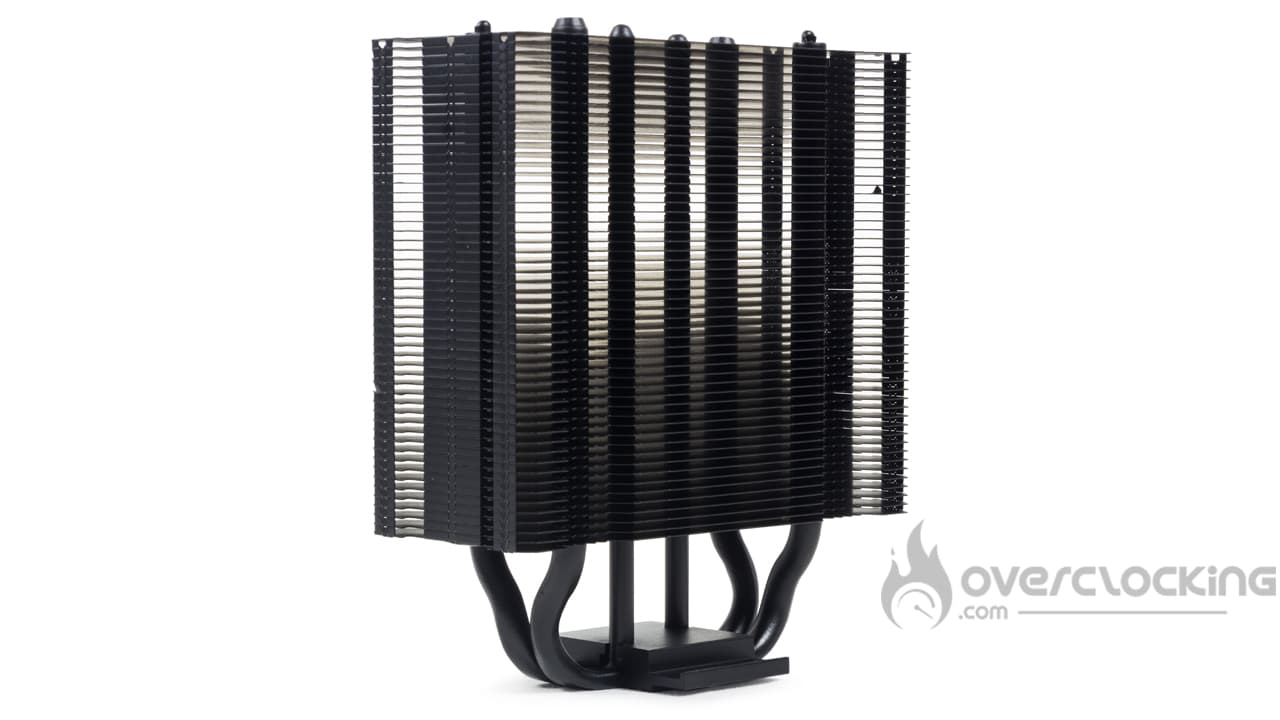
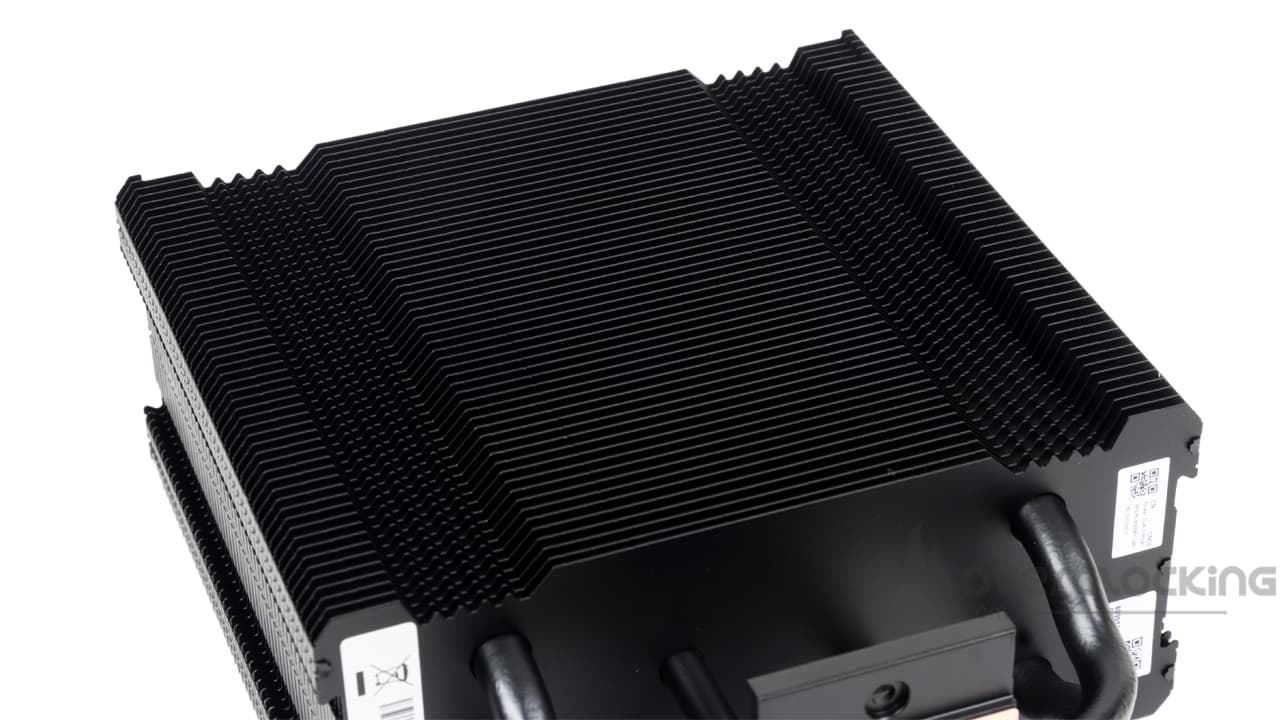
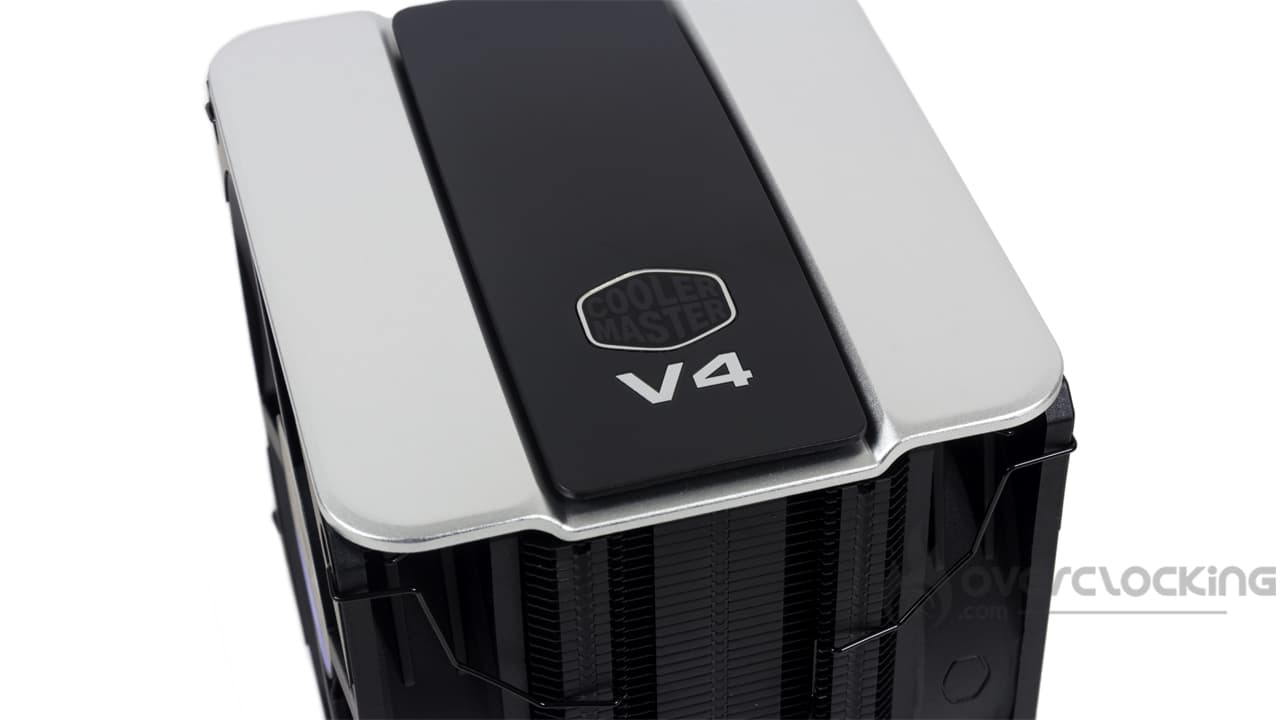 As for the heatsink itself, it consists of a stack of 53 aluminum fins. These fins feature a design that’s original to say the least, with a flat central profile and sawtooth-shaped cutouts on the sides.
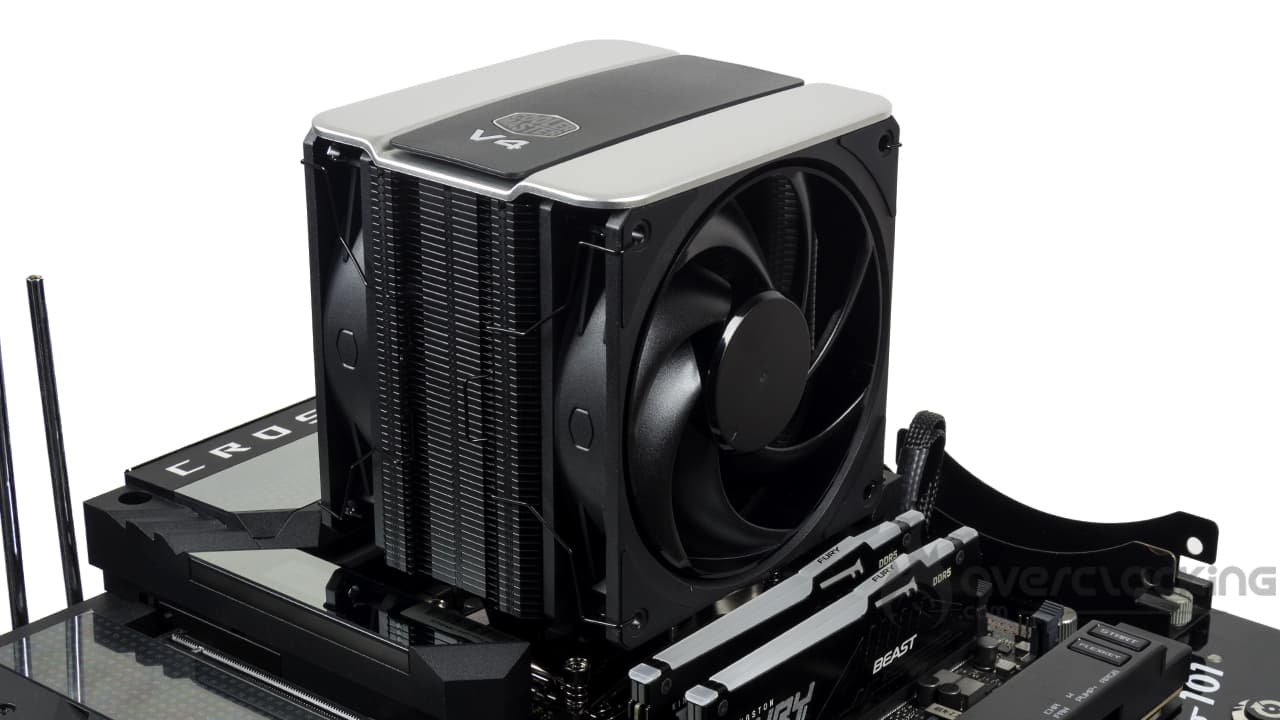
As for the finish, there’s no doubt about it—this V4 Alpha 3DHP Black looks great. The top panel is made of a gray, sandblasted aluminum plate with a black central insert. On top, there’s a Cooler Master logo and “V4” branding to remind you exactly what you’re looking at. The rest of the unit features a full matte black finish, whether on the aluminum fins or the copper heat pipes. The fans also match this color scheme.
Compatibility:
In terms of compatibility, Cooler Master states that its CPU cooler can be mounted on the following motherboards:
- Intel: LGA-1156/115x/1700/1851
- AMD: AM4 – AM5
Compatibility here is limited exclusively to mainstream Intel and AMD sockets. However, unlike the MAG CoreFrozr AA13, Cooler Master extends compatibility to older platforms such as the LGA-115x, which is gradually becoming obsolete.
The fan:
One thing to note about the fan on this V4 Alpha 3DHP is that it’s screwed directly onto the top shroud; however, to remove it, you’ll need a slim screwdriver to reach through the first hole in the fan and access the screw. Needless to say, using our standard Phillips-head screwdriver isn’t ideal.
In any case, we have two 120 mm Mobius fans, which feature a square frame with rubber mounts to minimize unwanted vibrations as much as possible. On the sides of the frame, there’s also a Cooler Master logo… just for style.
As you can see, there are seven fan blades. They feature a strongly curved profile with a thickness that remains constant along their entire length. They’re a far cry from the Arctic P12 blades, for example, which became very wide at their tips. Finally, the central hub is a respectable size.
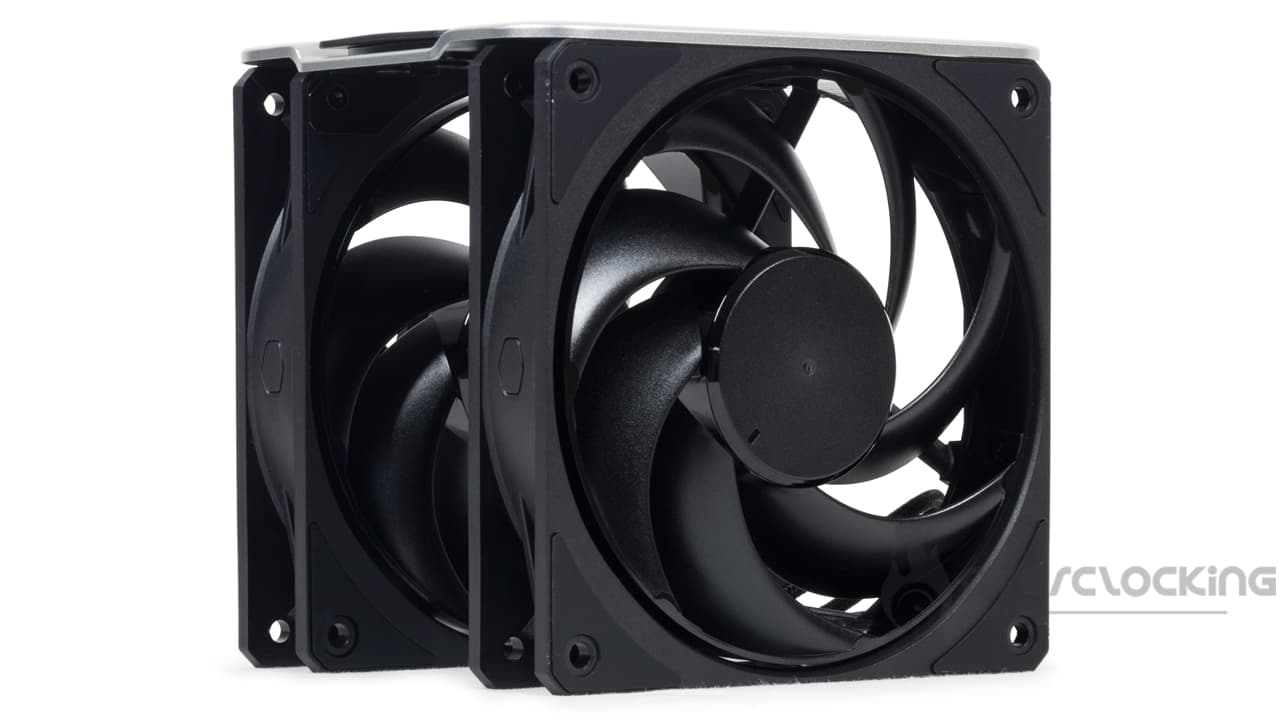 The connectivity here is kept to the essentials, as there are only two 4-pin PWM cables. There’s no RGB here, so the connections are kept to the bare essentials. Additionally, the cables—which measure just under 30 cm in length—are covered in a nice nylon sleeve.
Finally, the spec sheet lists a speed range of 0 to 2,500 RPM for the front fan, while the second fan will run slightly slower: 0 to 1,850 RPM. Airflow will therefore reach 63.1 CFM at the front compared to 50.5 CFM at the rear. The same applies to static pressure: the front fan will generate higher pressure than the rear one—2.69 mmH₂O versus 1.77 mmH₂O.
The bundle:
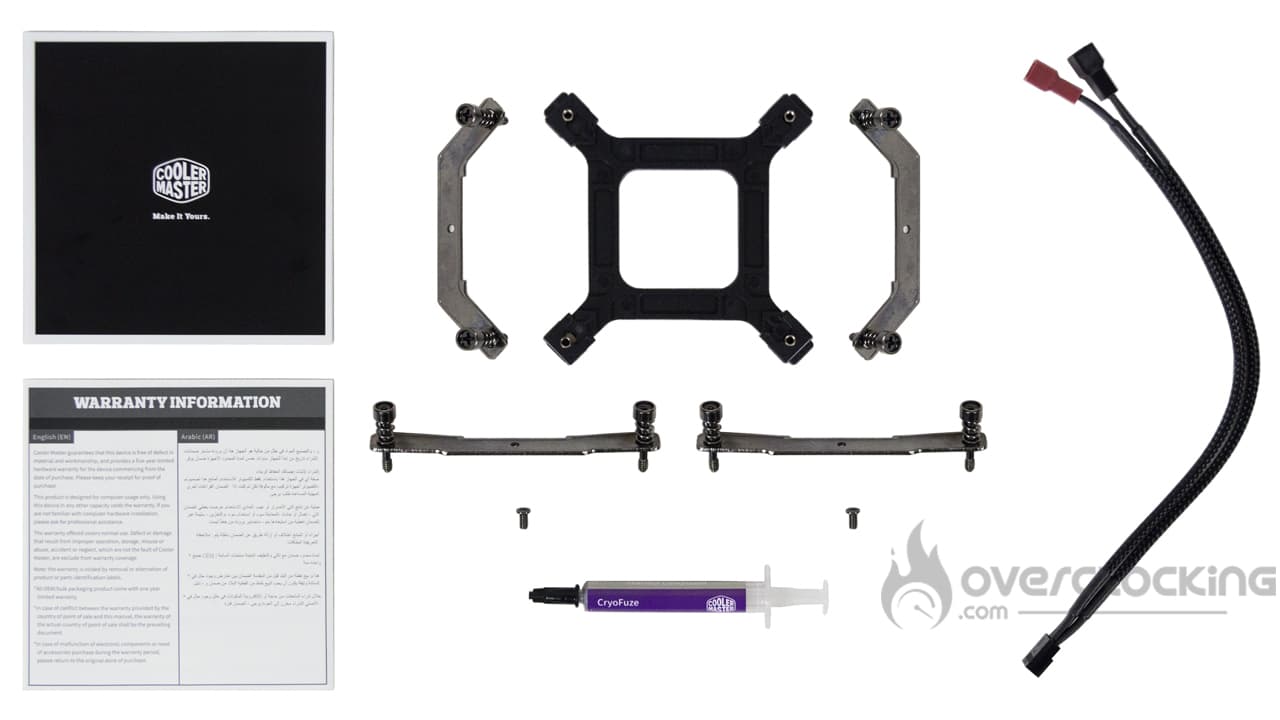
The accessories come in a small cardboard box lined with a plastic bag containing:
- An installation manual and the mandatory EU regulator guide
- Intel and AMD mounting arms
- Mounting screws for the mounting arms
- An Intel-side multi-socket backplate
- A PWMfan splitter
- A syringe of CryoFuze thermal paste
Accessories
In a nutshell:
Clearly, the V4 Alpha 3DHP is a CPU cooler designed to be visually appealing, featuring a very attractive finish. The aluminum top cover, combined with a full matte black finish on the fins and heat pipes, looks great, and Cooler Master even goes so far as to include sleeved cables for the fans. We’ll see if the installation is complicated—to find out, keep reading below.
Installation
For installation, you’ll need to keep your AMD backplate, as Cooler Master doesn’t include one. If you no longer have it, a quick search on eBay should help you find one easily.
Installing the V4 Alpha 3DHP Black:
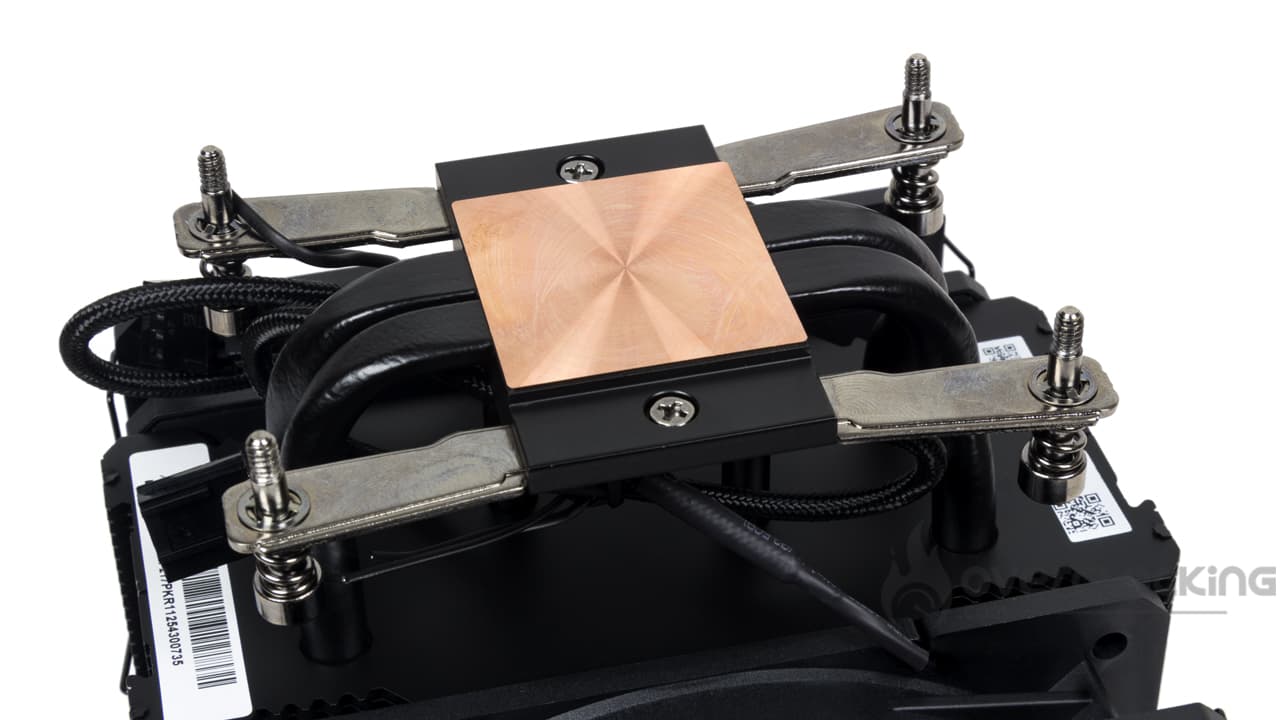
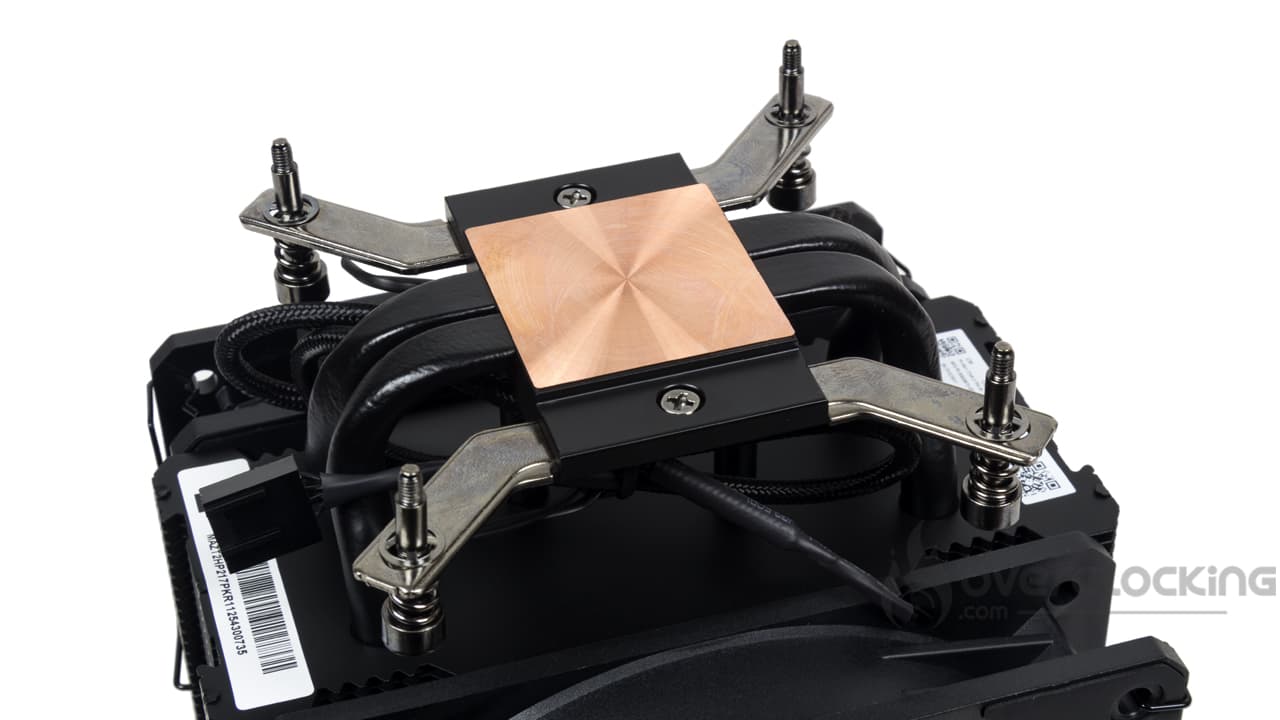
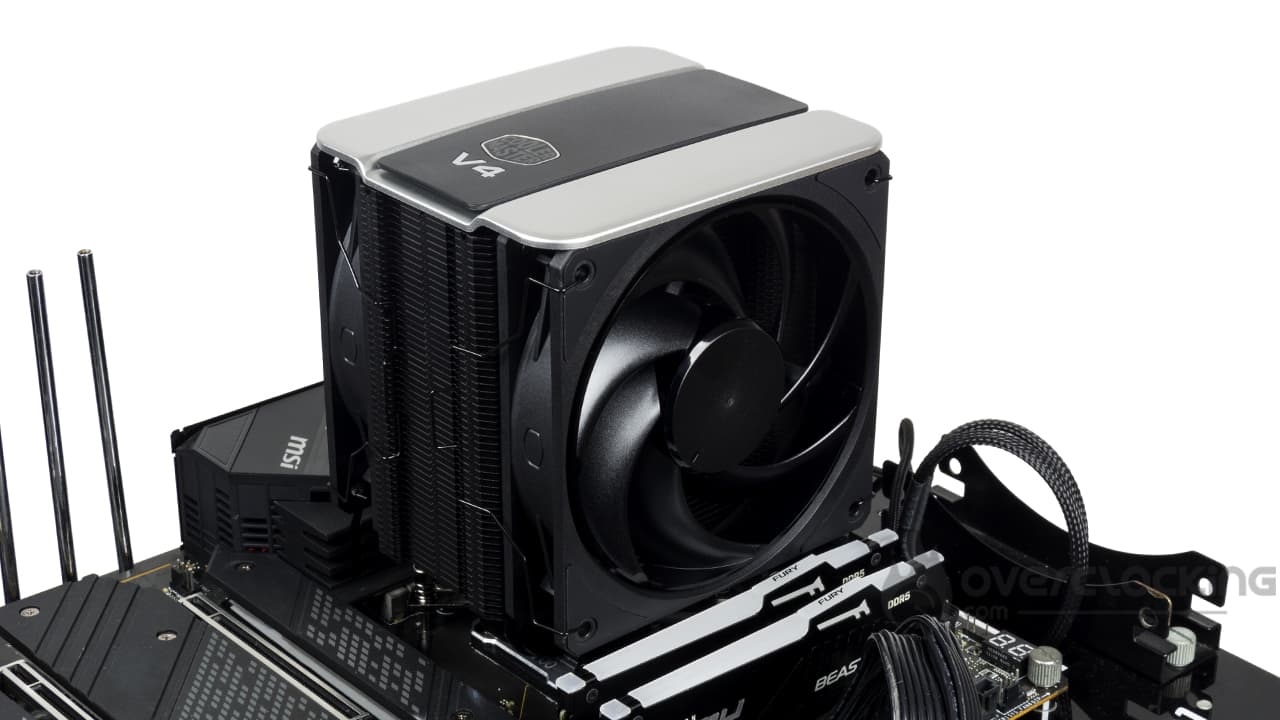
Clearly, installation isn’t a problem with this CPU cooler. The first step is to screw the mounting arms directly onto the cooler’s base. To do this, simply position the arms over the base and screw them in from below. Just make sure the screw threads are facing outward from the base, not inward.
For AMD systems, you’ll need to start by removing the original mounting arms from the motherboard before applying thermal paste to theCPU and positioning the cooler on the processor. All that’s left is to screw it in a crisscross pattern, and you’re all set. To screw in the heatsink, you’ll need to remove the fans; to do this, remove the steel clips holding them in place and take out both fans and the top shroud at once.
On an Intel motherboard, you’ll need to position the backplate on the back of the motherboard, making sure to align the screw holes correctly. For LGA-1700/1851 sockets, the screw holes must be positioned toward the outside of the socket, not toward the inside as with LGA-115x sockets. Next, apply thermal paste and screw the cooler onto the backplate.
All that’s left is to connect everything, which is quite simple: just connect the fans to the splitter and plug the splitter into the CPU_FANheader on the motherboard. Be careful, however, about the height of your RAM, as this model covers the first DIMM slot on an ATX motherboard.
Testing
We’ll share the results from our Ryzen 9 7900X at power draw levels of 65W, 105W, and 170W. Note that at the highest power draw, some coolers were unable to keep our processor cool, as the heat output was too intense.
Here, we are now measuring the difference between the temperature recorded on our CPU and the ambient temperature. Finally, fan speed control is now handled by our motherboard. During testing, we run the fans successively at 100%, 66%, and 33%.
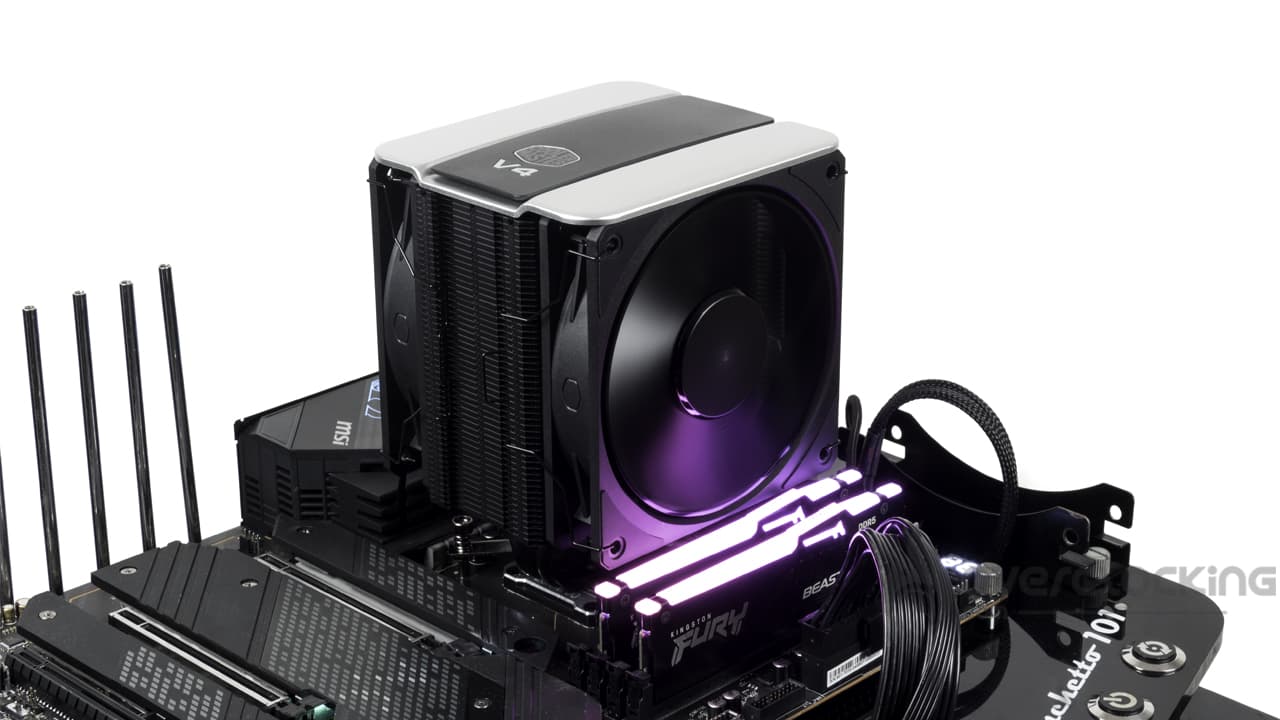 For the purposes of this test, we’ll compare the V4 Alpha 3DHP with other single-tower and dual-tower models in 120 mm and 140 mm sizes:
- A60B (SAMA): Intel – AMD
- Assassin IV VC Vision (DeepCool): Intel – AMD
- AK500 (DeepCool) – Intel
- AK700 Digital WH (DeepCool): Intel – AMD
- ETS-T41D (Enermax): Intel – AMD
- MAG CoreFrozr AA13 (MSI): Intel – AMD
- Noctua NH-D15 G2 (Noctua): Intel – AMD
- Pure Rock 3 Black (be quiet!): Intel – AMD
- T120 RGB (NZXT): Intel – AMD
- V4 Alpha 3DHP Black (Cooler Master): Intel – AMD
Speed and Noise:
Fan Speed:
So let’s dive into our series of temperature readings—we’re starting from scratch here. Let’s also note the fan speeds recorded during our tests (for 12V, 8V, 5V):
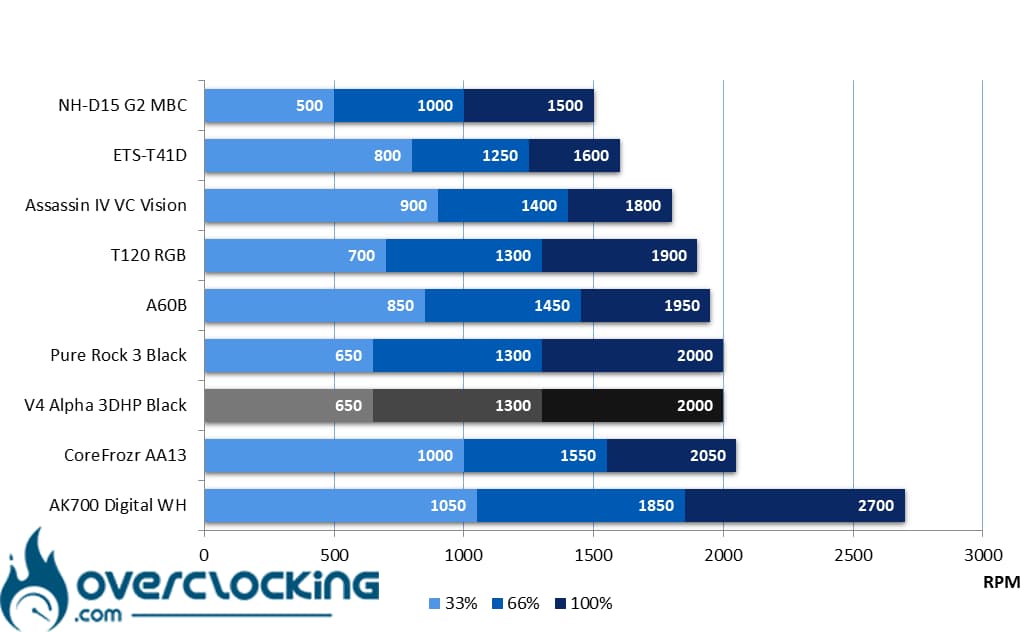 The two Mobius 120 fans mounted on this V4 Alpha 3DHP Black easily reach a maximum speed of 2,000 RPM. Clearly, this is a standard speed range found in many fans designed for CPU cooling systems, whether air-cooled or water-cooled. At medium speed, the fans run at 1,300 RPM, dropping to 650 RPM at low speed.
Noise:
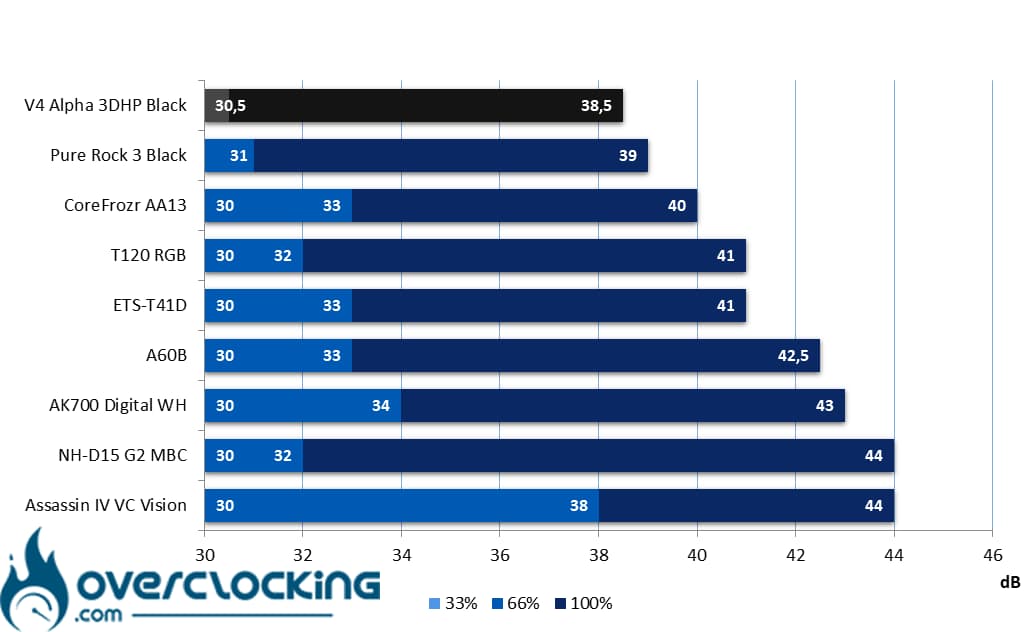 This heatsink is clearly designed for quiet operation. Despite having two fans, noise levels remain well under control, as our sound level meter recorded only 38.5 dB at full speed! At medium speed, the noise level drops to just 30.5 dB—you really have to strain to hear anything—while at low speed, it’s completely silent!
AMD CPU Temperatures:
65W Processor:
We’ll start with our 65W profile—a power draw that’s actually quite low, especially when compared to today’s powerhouses. This setting is designed to simulate small processors with few cores or low power consumption.
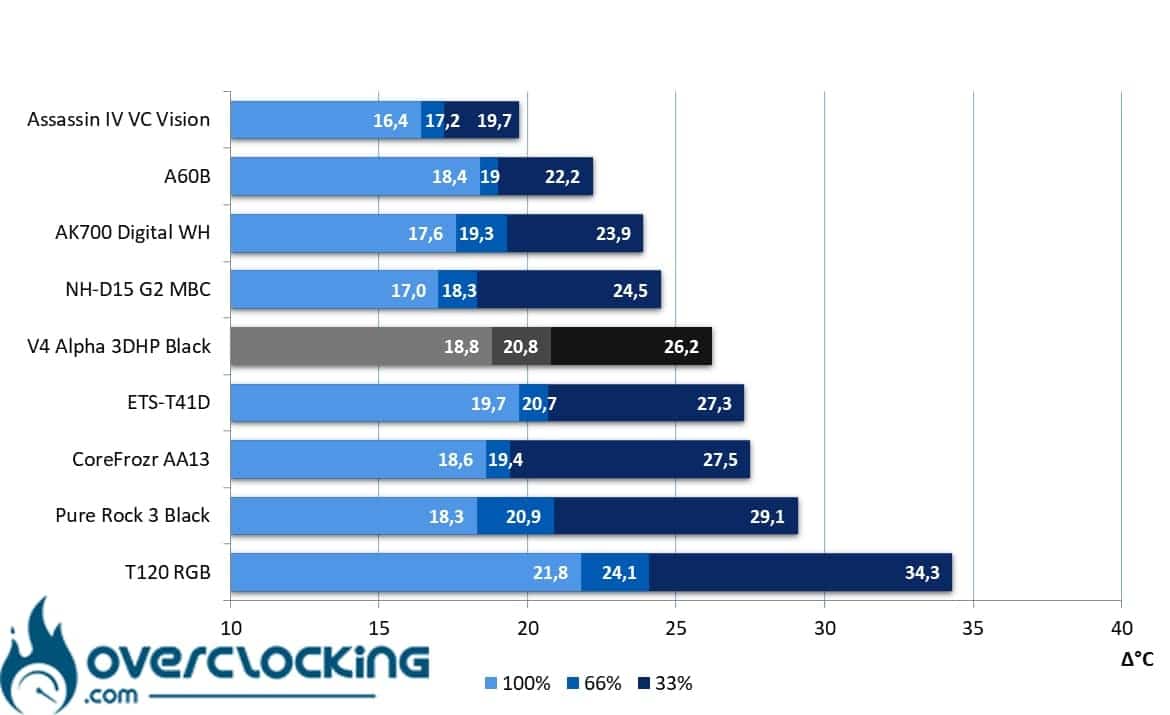 With a power draw of 65W, there’s clearly no need to worry about overheating—far from it. Under these conditions, the Cooler Master heatsink performs well, falling somewhere between dual-tower models and smaller, more entry-level air coolers. Still, at low speeds, temperatures tend to rise quickly.
105W Processor:
Here, our CPU will run at 2.70 GHz constantly across all its cores. We set the VCore to 1.030 to achieve a power draw of around 100 watts. This corresponds to the TDP value of a Ryzen 7 7700X.
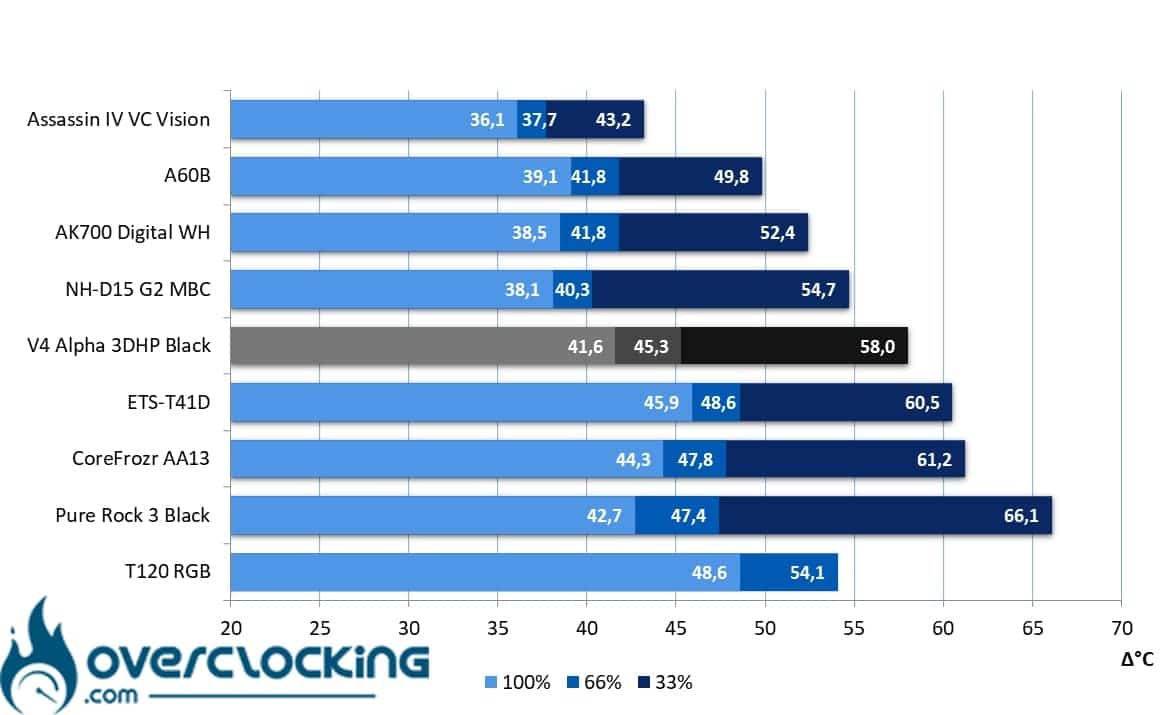 With slightly higher power consumption, the V4 Alpha 3DHP Black stands out even more from entry-level four-heat-pipe coolers like the CoreFrozr AA13 or the T120 RGB. It fits right where you’d expect it to—between the large dual-tower coolers and these more affordable, less bulky models.
170W Processor:
Finally, we’ll wrap up with our 170W profile. Here, heat dissipation is higher, matching the 7900X’s default TDP. Let’s see how our coolers perform!
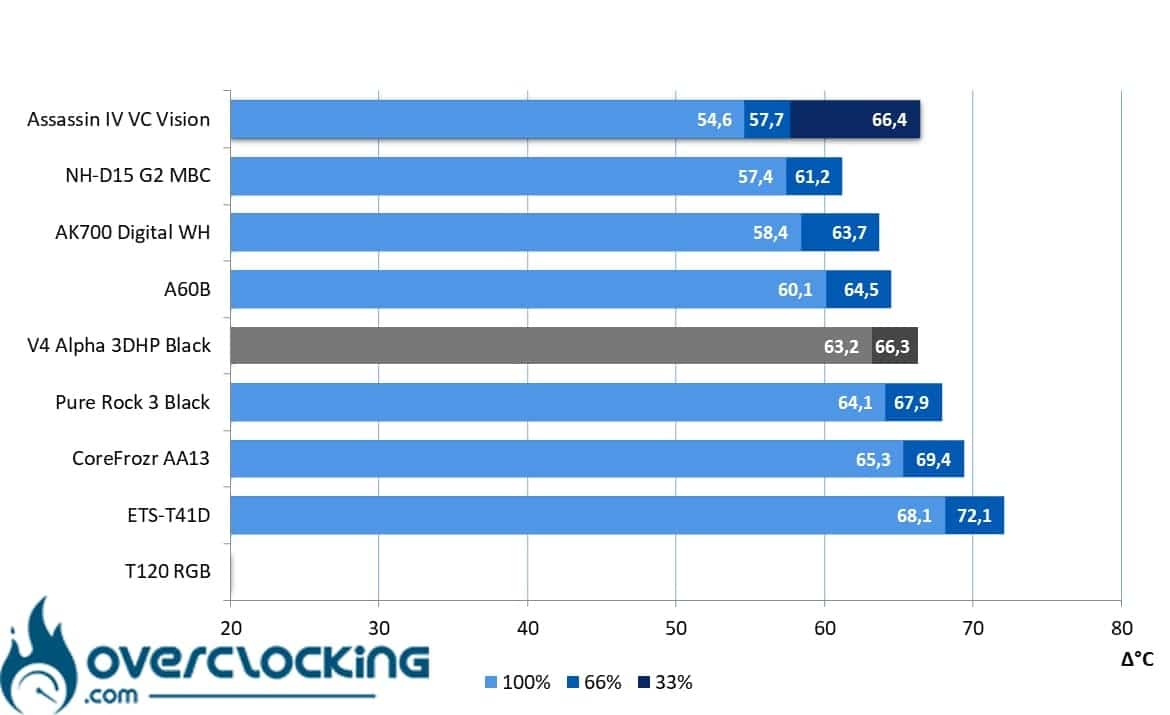 At 170W, the V4 Alpha 3DHP can’t handle the load from our low-speed processor, but don’t panic—it’s clearly not the only one in this situation. As is, it ranks ahead of a be quiet! Pure Rock 3 but trails behind SAMA’s A60B, a 120mm dual-tower cooler.
AMD Temperature-to-Noise Ratio:
On these performance-to-noise ratio charts, remember that the best position is as far down and to the left of the chart as possible. For reference, the point farthest to the left represents 12V fan speed, the one in the center represents 8V fan speed, and the one farthest to the right represents 5V fan speed.
65W power consumption:
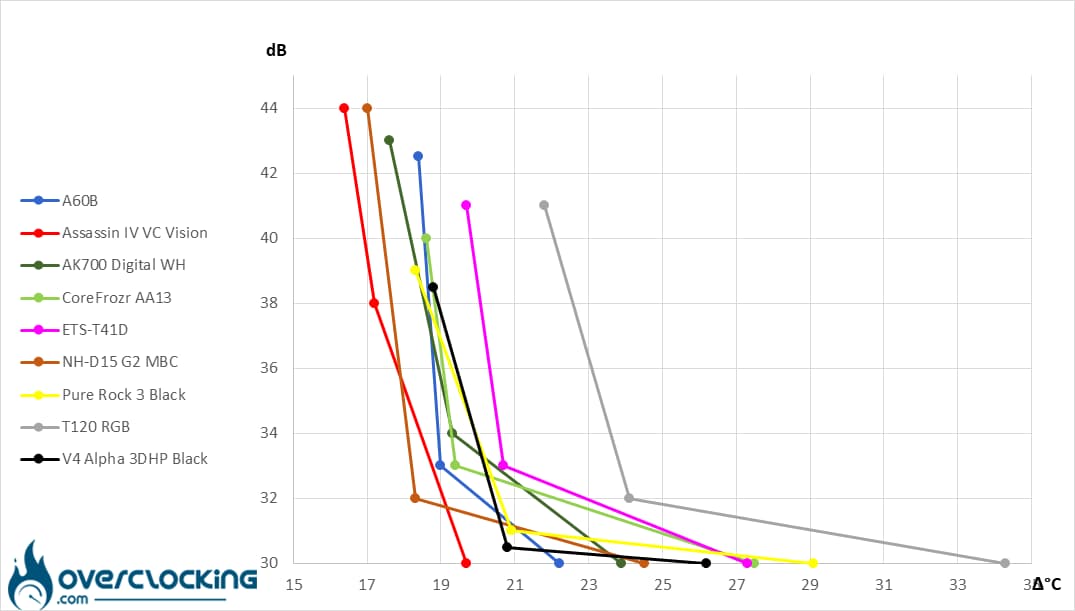 Compared to the competition, this heatsink prioritizes quiet operation, as evidenced by its low position on the graph. However, at high speeds, it’s neck-and-neck with the Pure Rock 3, while maintaining a slight edge at low speeds.
105W power draw:
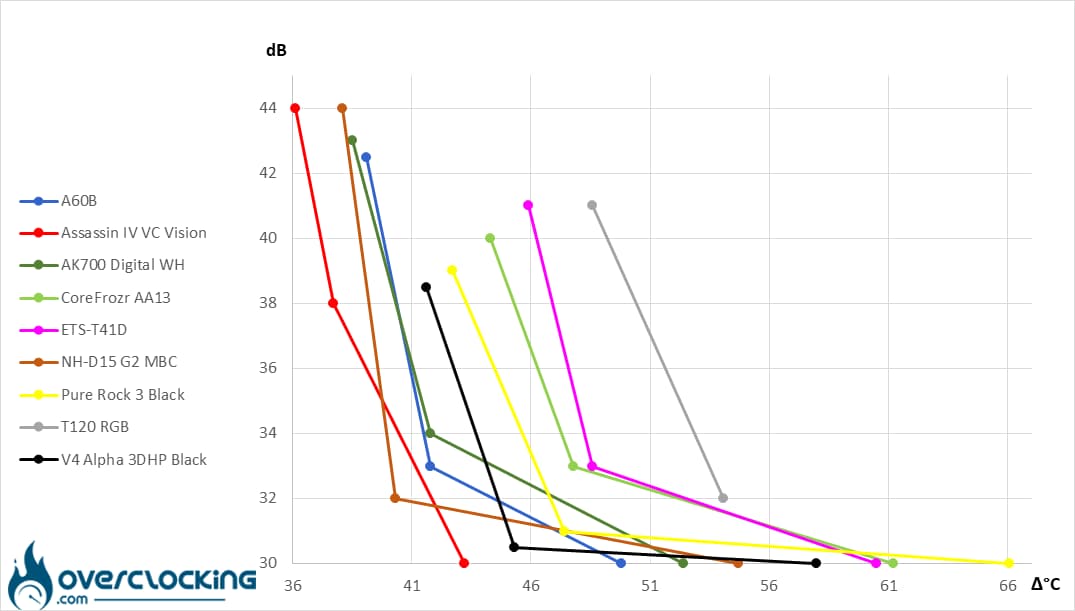 With higher power consumption, the V4 Alpha 3DHP Black clearly outperforms the be quiet! Pure Rock 3 and leaves the small, entry-level coolers in the dust. As is, it’s a good middle ground between the A60B/AK700 Digital WH and other slim solutions that are more entry-level in nature!
170W power consumption:
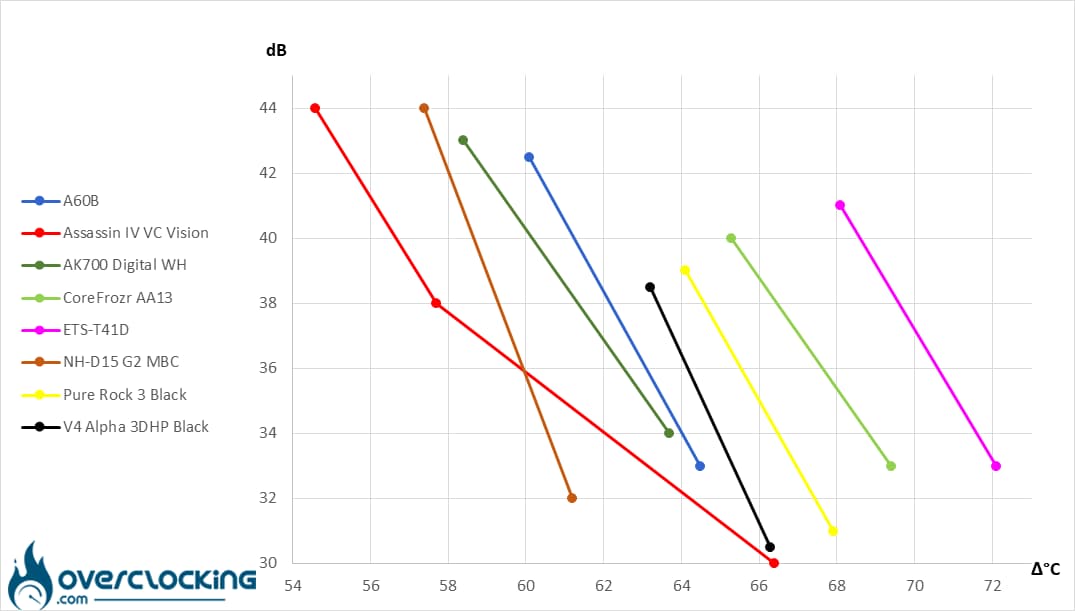 Finally, with a power draw of 170W, our test unit today can rival an Assassin IV VC Vision at low fan speeds while operating at medium load. Otherwise, it once again bridges the gap between “small” and “large” cooling solutions!
Intel CPU Temperatures:
65W processor:
We’ll start with the 65W profile, which is actually quite low, especially when you consider the base power consumption of this 13600KF. Here, we’re simulating the performance of small processors with few cores or low power consumption. In theory, everyone should do just fine!
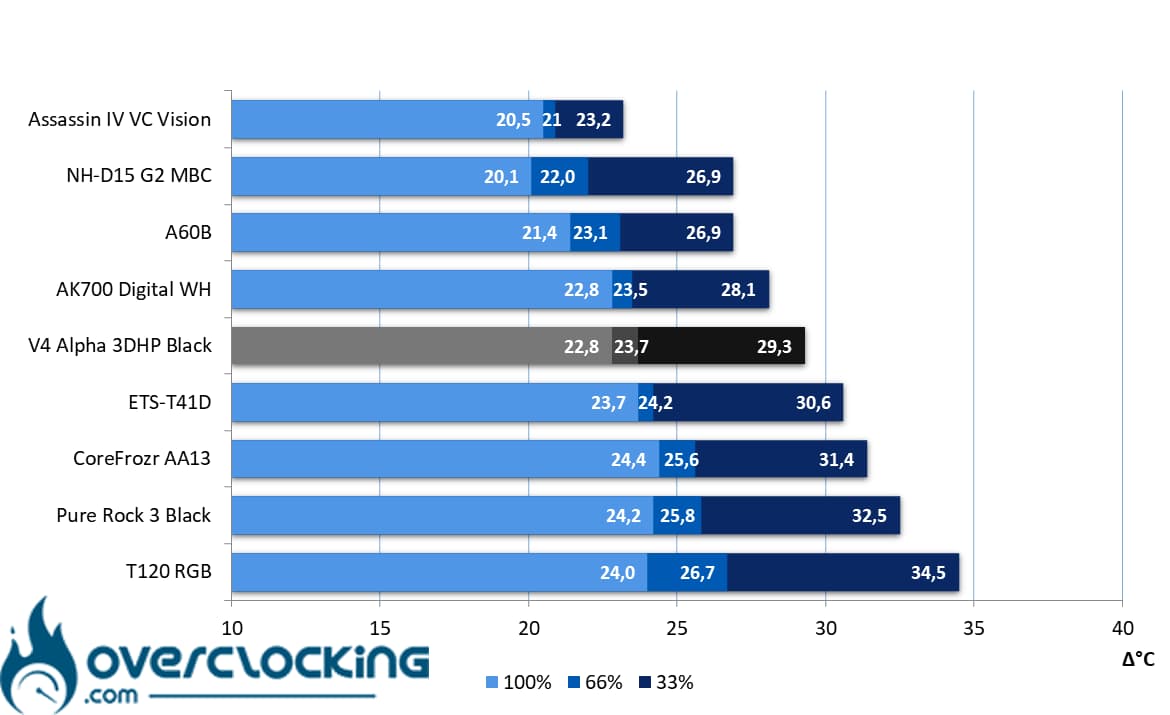 With an Intel processor that draws only 65W, the V4 Alpha 3DHP Black performs on par with an AK700 Digital WHat its highest load levels. While this is a respectable result, it might not last long, since DeepCool’s heatsink is truly formidable.
125W Processor:
Here, we’re taking our readings on a Core i5 13600KF, which draws 125W—the base power consumption for this processor. This corresponds to the processor’s sustained power draw.
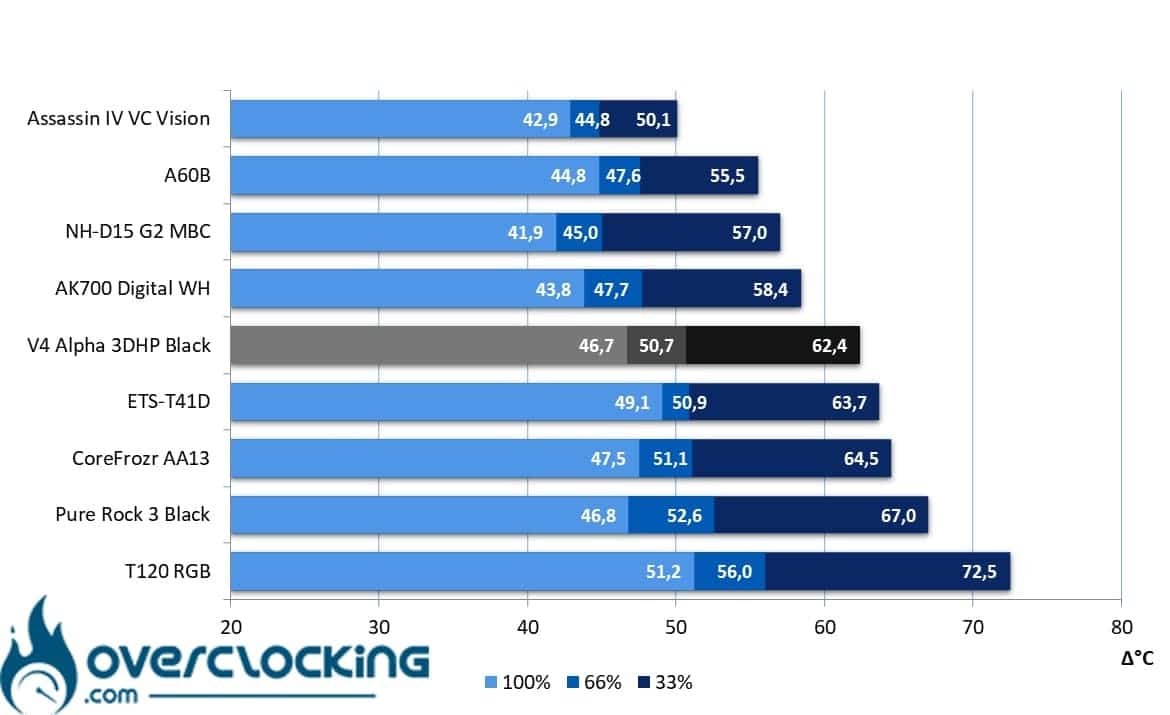 As power consumption increases, the Cooler Master CPU cooler rivals the be quiet! Pure Rock 3 at high speeds but performs better at low speeds. It’s worth noting that having two fans helps under these conditions. Furthermore, it performs slightly better than the Enermax ETS-T41D, which also features a push/pull configuration.
170W Processor:
Finally, we wrap up our series of tests with our Core i5 13600KF, which draws 170W. For this, we push the clock speeds a bit higher and increase the VCore, which now reaches 1.350V!
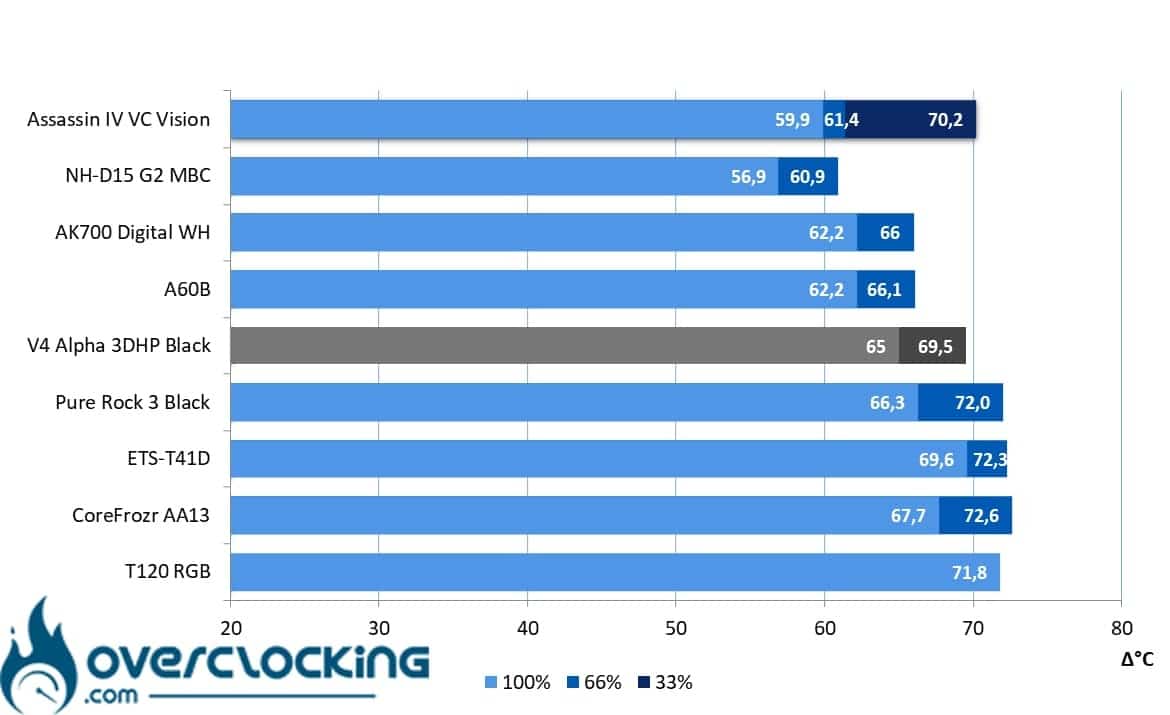 At 170W, once again, the be quiet! Pure Rock 3 is hot on the heels of our Cooler Master heatsink, but the latter ultimately pulls ahead at mid-load with better temperature control. However, it can’t keep up with our Core i5 13600KF at low speeds.
Intel Temperature-to-Noise Ratio:
On these performance-to-noise ratio charts, remember that the best position is as far down and to the left as possible. For reference, the point farthest to the left represents 12V fan operation, the one in the center represents 8V fan operation, and the one farthest to the right represents 5V fan operation.
65W power draw:
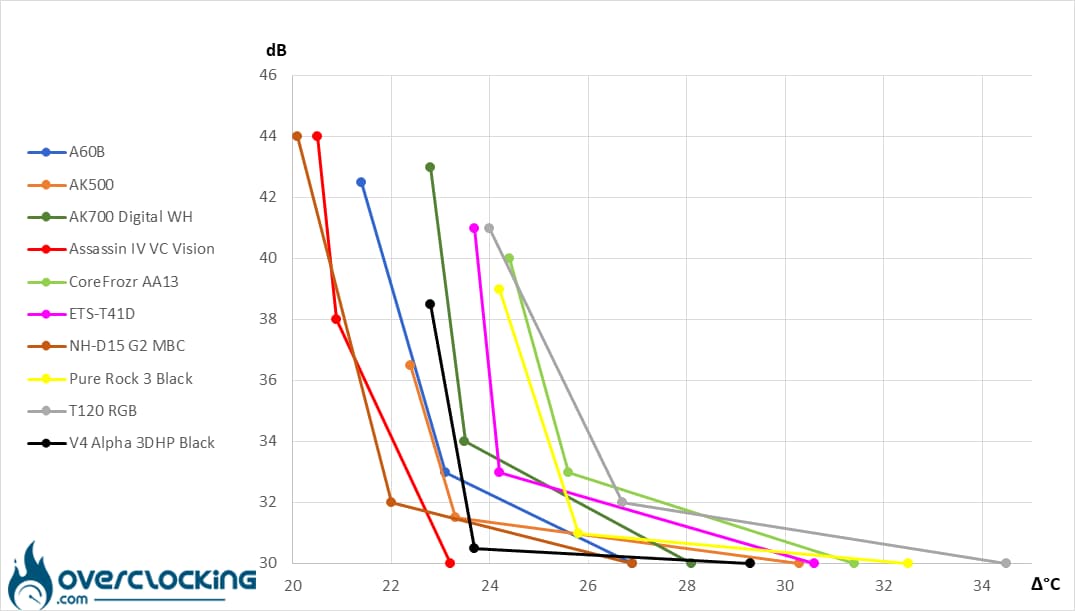 On the temperature-to-noise ratio chart, the V4 Alpha 3DHP Black performs quite aggressively, ranking not far behind DeepCool’s AK500. Similarly, the AK700 Digital WH struggles due to its significant noise levels. However, we’re dealing with a relatively undemanding workload here, and any reasonably substantial cooling solution can handle these conditions.
125W power consumption:
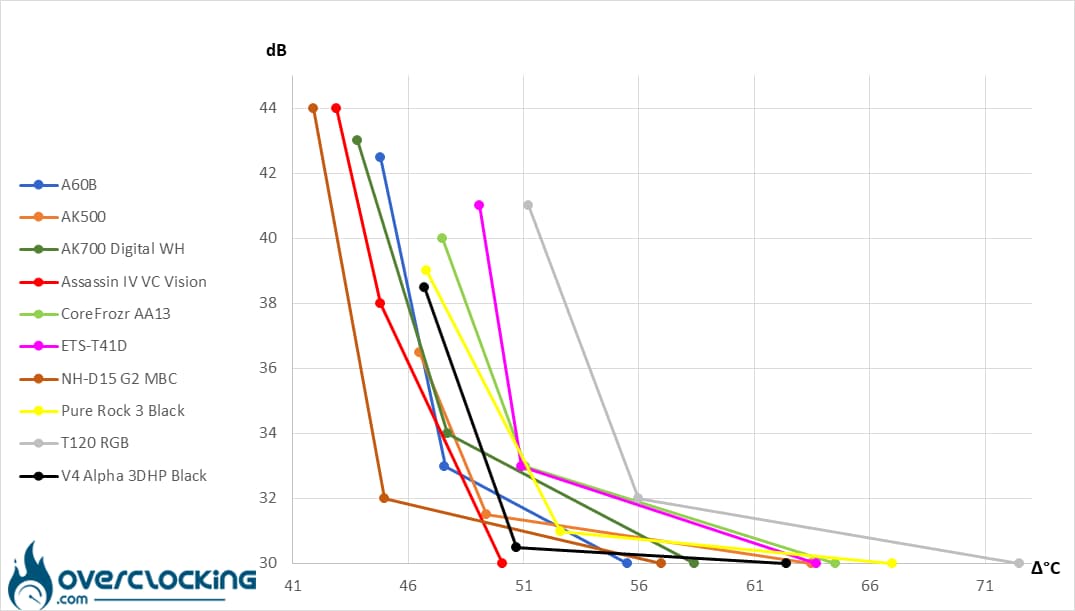 With power consumption rising to 125W, the Cooler Master CPU cooler finds itself competing more directly with the DeepCool AK500, a particularly thick 120mm CPU cooler. Furthermore, it’s at medium speed that the cooler really shows its potential, performing aggressively.
170W power draw:
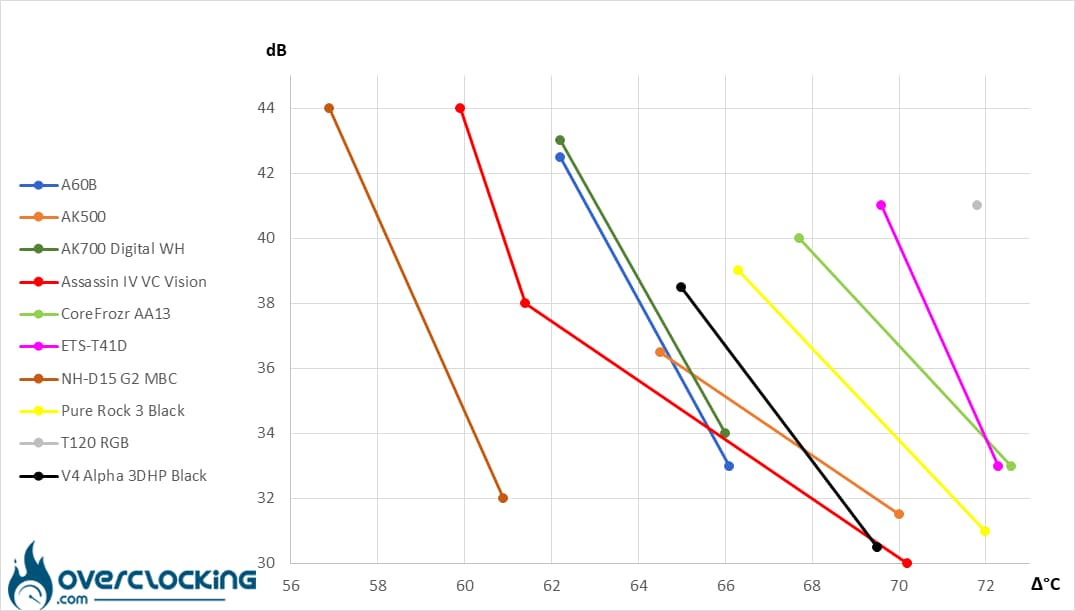 Finally, with its high power consumption, the V4 Alpha 3DHP Black marks a clear break from the Pure Rock 3 and other entry-level solutions. It positions itself more as a rival to the much thickerAK500, though it doesn’t quite measure up to larger coolers—even if it does overlap with the performance of an Assassin IV VC Vision running at low speeds.
Conclusion:
We’ve reached the end of this review of Cooler Master’s V4 Alpha 3DHP Black. So, is this a successful product? Let’s take a closer look!
A High-Quality Finish:
Cooler Master offers us a well-crafted model that features a high-quality finish. As we’ve seen, the top shroud is made of aluminum and draws inspiration from “V” engines, while the rest of the heatsink features an all-black coating. With this, we’re looking at a heatsink that comes standard with a push/pull configuration—though you’ll need to pay a bit of attention to the height, since it exceeds the “standard” 160 mm required for a hassle-free installation. Also, be mindful of your RAM: the radiator is thick, and the base isn’t offset, so it’s possible that the first fan could block a memory slot, depending on your motherboard.
Installation is simple, but be mindful of the space requirements:
On the other hand, the installation is really not complicated, and there are few parts to handle. Simply put, the mounting screws already in place on the arms make installation easy. You don’t have to screw spacers onto the motherboard and then attach the mounting arms, etc. It’s ready to go—just position the radiator, screw it onto the backplate, and you’re done. Plus, Cooler Master includes a syringe of its own thermal paste—Cryofuze—right in the box. This is a nice touch because by using only the necessary amount, you can complete multiple installations, which is handy for maintenance.
In terms of performance, the V4 Alpha 3DHP Black clearly stands out in the quiet CPU cooler category. Despite its two fans, this model is quieter than other models that have only a single fan… This is a real bonus, as it allows it to perform exceptionally well in the temperature-to-noise ratio, where—depending on conditions—it rivals some models that are larger than it.
What about the price?
Keep in mind that this CPU cooler isn’t exactly new and has already been on the market for a year. Thanks to this track record, it’s available at very attractive prices—such as on Amazon, where it’s on sale for under €30. The same goes for other retailers. At this price, it’s a great deal, since you’re getting a cooler that outperforms more traditional entry-level models, while offering a much higher-quality finish and low noise levels. Even at €40—its original price—it holds its own, but it’s worth keeping an eye on the competition.

